<?xml version="1.0" encoding="utf-8"?>
<feed xmlns="http://www.w3.org/2005/Atom"><title>KE Programmer</title>
<generator>Emacs webfeeder.el</generator>
<link href="https://programmer.ke/"/>
<link href="https://programmer.ke/atom.xml" rel="self"/>
<id>https://programmer.ke/atom.xml</id>
<updated>2026-07-15T09:24:51+03:00</updated>
<entry>
  <title>Binary Tree Basics</title>
  <author><name>KE Programmer</name></author>
  <summary>Published on Aug 18, 2024 13:26 by KE Programmer</summary>
  <content type="html"><![CDATA[<div id="content" class="content">
 <h1 class="title">Binary Tree Basics
 <br></br> <span class="subtitle">Published on Aug 18, 2024 13:26 by KE Programmer</span>
</h1>
 <div id="table-of-contents" role="doc-toc">
 <h2>Table of Contents</h2>
 <div id="text-table-of-contents" role="doc-toc">
 <ul> <li> <a href="#org315060b">1. Building a BST</a></li>
 <li> <a href="#org49c640a">2. In order Traversal</a>
 <ul> <li> <a href="#org4e4958e">2.1. Recursive</a></li>
 <li> <a href="#org71b6d1d">2.2. Iterative</a></li>
</ul></li>
 <li> <a href="#orgf5f8d4f">3. Pre-Order Traversal</a>
 <ul> <li> <a href="#orgb1aa871">3.1. Recursive</a></li>
 <li> <a href="#org65e3bc6">3.2. Iterative</a></li>
</ul></li>
 <li> <a href="#orgdef5f48">4. Post-Order Traversal</a>
 <ul> <li> <a href="#orgb9fb17f">4.1. Recursive</a></li>
 <li> <a href="#org4287d97">4.2. Iterative</a></li>
</ul></li>
 <li> <a href="#org00f2d35">5. Breadth first search</a></li>
 <li> <a href="#org06bb6ef">6. Deleting a node in a BST</a></li>
</ul></div>
</div>
 <div id="outline-container-org315060b" class="outline-2">
 <h2 id="org315060b"> <span class="section-number-2">1.</span> Building a BST</h2>
 <div class="outline-text-2" id="text-1">
 <p>
A tree is represented as an object with a pointer to the root
node.  An insert method is used to insert nodes to the correct
position maintaining the expected order using each node's value.
</p>

 <div class="org-src-container">
 <pre class="src src-python"> <span style="font-weight: bold;">from</span> dataclasses  <span style="font-weight: bold;">import</span> dataclass

 <span style="font-weight: bold; text-decoration: underline;">@dataclass</span>
 <span style="font-weight: bold;">class</span>  <span style="font-weight: bold; text-decoration: underline;">BST</span>:
     <span style="font-weight: bold; font-style: italic;">root</span>:  <span style="font-style: italic;">'Node'</span> =  <span style="font-weight: bold; text-decoration: underline;">None</span>

     <span style="font-weight: bold;">def</span>  <span style="font-weight: bold;">insert</span>( <span style="font-weight: bold;">self</span>, value):
         <span style="font-weight: bold;">if</span>  <span style="font-weight: bold;">self</span>.root  <span style="font-weight: bold;">is</span>  <span style="font-weight: bold; text-decoration: underline;">None</span>:
             <span style="font-weight: bold;">self</span>. <span style="font-weight: bold; font-style: italic;">root</span> = Node(value)
         <span style="font-weight: bold;">else</span>:
             <span style="font-weight: bold;">self</span>._insert_into_tree( <span style="font-weight: bold;">self</span>.root, value)

     <span style="font-weight: bold;">def</span>  <span style="font-weight: bold;">_insert_into_tree</span>( <span style="font-weight: bold;">self</span>, node, value):
         <span style="font-weight: bold;">if</span> value < node.value:
             <span style="font-weight: bold;">if</span> node.left  <span style="font-weight: bold;">is</span>  <span style="font-weight: bold; text-decoration: underline;">None</span>:
                node. <span style="font-weight: bold; font-style: italic;">left</span> = Node(value)
             <span style="font-weight: bold;">else</span>:
                 <span style="font-weight: bold;">self</span>._insert_into_tree(node.left, value)
         <span style="font-weight: bold;">else</span>:
             <span style="font-weight: bold;">if</span> node.right  <span style="font-weight: bold;">is</span>  <span style="font-weight: bold; text-decoration: underline;">None</span>:
                node. <span style="font-weight: bold; font-style: italic;">right</span> = Node(value)
             <span style="font-weight: bold;">else</span>:
                 <span style="font-weight: bold;">self</span>._insert_into_tree(node.right, value)


 <span style="font-weight: bold; text-decoration: underline;">@dataclass</span>
 <span style="font-weight: bold;">class</span>  <span style="font-weight: bold; text-decoration: underline;">Node</span>:
    value:  <span style="font-weight: bold;">int</span>
     <span style="font-weight: bold; font-style: italic;">right</span>:  <span style="font-style: italic;">'Node'</span> =  <span style="font-weight: bold; text-decoration: underline;">None</span>
     <span style="font-weight: bold; font-style: italic;">left</span>:  <span style="font-style: italic;">'Node'</span> =  <span style="font-weight: bold; text-decoration: underline;">None</span>
</pre>
</div>


 <p>
Build the tree:
</p>

 <div class="org-src-container">
 <pre class="src src-python"> <span style="font-weight: bold; font-style: italic;">items</span> = [7, 9, 5, 2, 7, 8, 10, 5]
 <span style="font-weight: bold; font-style: italic;">tree</span> = BST()
 <span style="font-weight: bold;">for</span> i  <span style="font-weight: bold;">in</span> items:
    tree.insert(i)

 <span style="font-weight: bold;">print</span>(tree)

 <span style="font-weight: bold; font-style: italic;"># </span> <span style="font-weight: bold; font-style: italic;">BST(
</span> <span style="font-weight: bold; font-style: italic;">#     </span> <span style="font-weight: bold; font-style: italic;">root=Node(
</span> <span style="font-weight: bold; font-style: italic;">#         </span> <span style="font-weight: bold; font-style: italic;">value=7,
</span> <span style="font-weight: bold; font-style: italic;">#         </span> <span style="font-weight: bold; font-style: italic;">right=Node(
</span> <span style="font-weight: bold; font-style: italic;">#             </span> <span style="font-weight: bold; font-style: italic;">value=9,
</span> <span style="font-weight: bold; font-style: italic;">#             </span> <span style="font-weight: bold; font-style: italic;">right=Node(value=10, right=None, left=None),
</span> <span style="font-weight: bold; font-style: italic;">#             </span> <span style="font-weight: bold; font-style: italic;">left=Node(value=7, right=Node(value=8, right=None, left=None), left=None),
</span> <span style="font-weight: bold; font-style: italic;">#         </span> <span style="font-weight: bold; font-style: italic;">),
</span> <span style="font-weight: bold; font-style: italic;">#         </span> <span style="font-weight: bold; font-style: italic;">left=Node(
</span> <span style="font-weight: bold; font-style: italic;">#             </span> <span style="font-weight: bold; font-style: italic;">value=5,
</span> <span style="font-weight: bold; font-style: italic;">#             </span> <span style="font-weight: bold; font-style: italic;">right=Node(value=5, right=None, left=None),
</span> <span style="font-weight: bold; font-style: italic;">#             </span> <span style="font-weight: bold; font-style: italic;">left=Node(value=2, right=None, left=None),
</span> <span style="font-weight: bold; font-style: italic;">#         </span> <span style="font-weight: bold; font-style: italic;">),
</span> <span style="font-weight: bold; font-style: italic;">#     </span> <span style="font-weight: bold; font-style: italic;">)
</span> <span style="font-weight: bold; font-style: italic;"># </span> <span style="font-weight: bold; font-style: italic;">)
</span>
</pre>
</div>

 <p>
At this point, the tree looks like below:
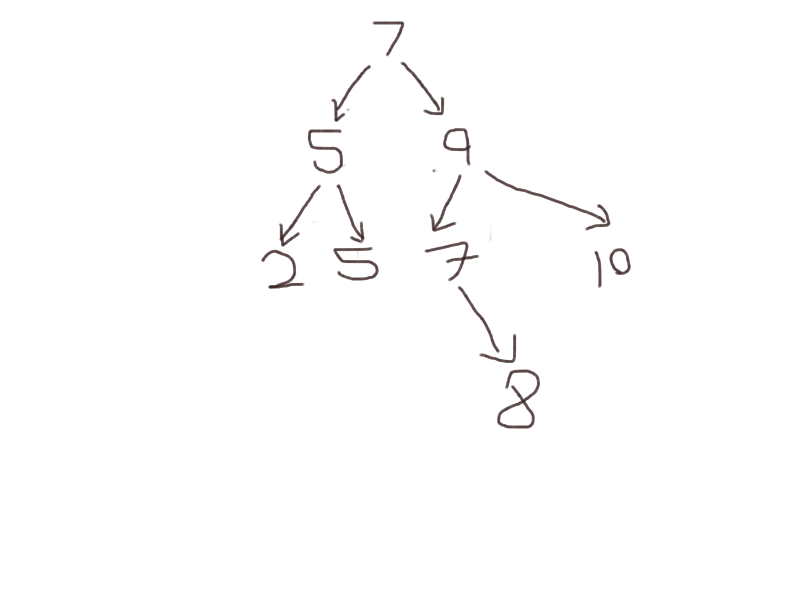
</p>


 <div id="org61de4ed" class="figure">
 <p> <img src="img/sample_bst_tree.png" alt="sample_bst_tree.png"></img></p>
</div>
</div>
</div>
 <div id="outline-container-org49c640a" class="outline-2">
 <h2 id="org49c640a"> <span class="section-number-2">2.</span> In order Traversal</h2>
 <div class="outline-text-2" id="text-2">
 <p>
For each node, the action is performed on the values in the left
subtree, then the current node's value, then the value of the right
subtree.
</p>

 <p>
This can be used to perform an action in ascending order of
values in the tree.
</p>

 <p>
Here, the action would be to simply print out the node's value.
</p>

 <div class="org-src-container">
 <pre class="src src-python"> <span style="font-weight: bold;">def</span>  <span style="font-weight: bold;">action</span>(value):
     <span style="font-weight: bold;">print</span>(value, end= <span style="font-style: italic;">" "</span>)
</pre>
</div>
</div>
 <div id="outline-container-org4e4958e" class="outline-3">
 <h3 id="org4e4958e"> <span class="section-number-3">2.1.</span> Recursive</h3>
 <div class="outline-text-3" id="text-2-1">
 <p>
The traversing function is called recursively on each node
</p>

 <div class="org-src-container">
 <pre class="src src-python"> <span style="font-weight: bold;">def</span>  <span style="font-weight: bold;">inorder_recursive</span>(node, action):
     <span style="font-weight: bold;">if</span> node.left:
        inorder_recursive(node.left, action)
    action(node.value)
     <span style="font-weight: bold;">if</span> node.right:
        inorder_recursive(node.right, action)

inorder_recursive(tree.root, action)   <span style="font-weight: bold; font-style: italic;"># </span> <span style="font-weight: bold; font-style: italic;">2 5 5 7 7 8 9 10</span>
</pre>
</div>

 <p>
The output is the tree's values in ascending order.
</p>
</div>
</div>
 <div id="outline-container-org71b6d1d" class="outline-3">
 <h3 id="org71b6d1d"> <span class="section-number-3">2.2.</span> Iterative</h3>
 <div class="outline-text-3" id="text-2-2">
 <p>
Traversing iteratively uses a stack to track nodes to visit. Ensure
that the node action is performed on the nodes in the correct order
by inserting the nodes into the stack in reverse order.
</p>

 <p>
Additionally, keep track of nodes have been processed, i.e. their
children inserted into the stack, to avoid getting stack in an
infinite loop.
</p>

 <div class="org-src-container">
 <pre class="src src-python"> <span style="font-weight: bold;">def</span>  <span style="font-weight: bold;">inorder_iterative</span>(node, action):
     <span style="font-weight: bold; font-style: italic;">stack</span> = []
     <span style="font-weight: bold; font-style: italic;">processed</span> =  <span style="font-weight: bold;">set</span>()
    stack.append(node)
     <span style="font-weight: bold;">while</span> stack:
         <span style="font-weight: bold; font-style: italic;">n</span> = stack.pop()
         <span style="font-weight: bold;">if</span>  <span style="font-weight: bold;">id</span>(n)  <span style="font-weight: bold;">in</span> processed:
            action(n.value)
         <span style="font-weight: bold;">else</span>:
             <span style="font-weight: bold;">if</span> n.right:
                stack.append(n.right)
            stack.append(n)
             <span style="font-weight: bold;">if</span> n.left:
                stack.append(n.left)
            processed.add( <span style="font-weight: bold;">id</span>(n))

inorder_iterative(tree.root, action)   <span style="font-weight: bold; font-style: italic;"># </span> <span style="font-weight: bold; font-style: italic;">2 5 5 7 7 8 9 10</span>
</pre>
</div>
</div>
</div>
</div>
 <div id="outline-container-orgf5f8d4f" class="outline-2">
 <h2 id="orgf5f8d4f"> <span class="section-number-2">3.</span> Pre-Order Traversal</h2>
 <div class="outline-text-2" id="text-3">
 <p>
For each node, the action is performed on the node's value, followed
by the node's left subtree values then the node's right subtree
values.
</p>

 <p>
This can be used, for instance, to create a copy of the tree with the
same structure since each parent node is visited before the children.
</p>
</div>
 <div id="outline-container-orgb1aa871" class="outline-3">
 <h3 id="orgb1aa871"> <span class="section-number-3">3.1.</span> Recursive</h3>
 <div class="outline-text-3" id="text-3-1">
 <div class="org-src-container">
 <pre class="src src-python"> <span style="font-weight: bold;">def</span>  <span style="font-weight: bold;">preorder_recursive</span>(node, action):
    action(node.value)
     <span style="font-weight: bold;">if</span> node.left:
        preorder_recursive(node.left, action)
     <span style="font-weight: bold;">if</span> node.right:
        preorder_recursive(node.right, action)

preorder_recursive(tree.root, action)   <span style="font-weight: bold; font-style: italic;"># </span> <span style="font-weight: bold; font-style: italic;">7 5 2 5 9 7 8 10</span>
</pre>
</div>
</div>
</div>
 <div id="outline-container-org65e3bc6" class="outline-3">
 <h3 id="org65e3bc6"> <span class="section-number-3">3.2.</span> Iterative</h3>
 <div class="outline-text-3" id="text-3-2">
 <p>
A stack is used to keep track of nodes to traverse. Action is performed
in order of popping items from the stack
</p>


 <div class="org-src-container">
 <pre class="src src-python"> <span style="font-weight: bold;">def</span>  <span style="font-weight: bold;">preorder_iterative</span>(node, action):
     <span style="font-weight: bold; font-style: italic;">stack</span> = []
    stack.append(node)
     <span style="font-weight: bold;">while</span> stack:
         <span style="font-weight: bold; font-style: italic;">n</span> = stack.pop()
         <span style="font-weight: bold;">if</span> n.right:
            stack.append(n.right)
         <span style="font-weight: bold;">if</span> n.left:
            stack.append(n.left)
        action(n.value)

preorder_iterative(tree.root, action)   <span style="font-weight: bold; font-style: italic;"># </span> <span style="font-weight: bold; font-style: italic;">7 5 2 5 9 7 8 10</span>
</pre>
</div>
</div>
</div>
</div>
 <div id="outline-container-orgdef5f48" class="outline-2">
 <h2 id="orgdef5f48"> <span class="section-number-2">4.</span> Post-Order Traversal</h2>
 <div class="outline-text-2" id="text-4">
 <p>
For each node, the action is performed on the left subtree values,
then the right subtree values and finally the current node's values.
</p>


 <p>
This can be used, for instance, to delete a tree, because each nodes
children are processed before the node itself, all the way to the root.
</p>
</div>
 <div id="outline-container-orgb9fb17f" class="outline-3">
 <h3 id="orgb9fb17f"> <span class="section-number-3">4.1.</span> Recursive</h3>
 <div class="outline-text-3" id="text-4-1">
 <div class="org-src-container">
 <pre class="src src-python"> <span style="font-weight: bold;">def</span>  <span style="font-weight: bold;">postorder_recursive</span>(node, action):
     <span style="font-weight: bold;">if</span> node.left:
        postorder_recursive(node.left, action)
     <span style="font-weight: bold;">if</span> node.right:
        postorder_recursive(node.right, action)
    action(node.value)

postorder_recursive(tree.root, action)   <span style="font-weight: bold; font-style: italic;"># </span> <span style="font-weight: bold; font-style: italic;">2 5 5 8 7 10 9 7</span>
</pre>
</div>
</div>
</div>
 <div id="outline-container-org4287d97" class="outline-3">
 <h3 id="org4287d97"> <span class="section-number-3">4.2.</span> Iterative</h3>
 <div class="outline-text-3" id="text-4-2">
 <div class="org-src-container">
 <pre class="src src-python"> <span style="font-weight: bold;">def</span>  <span style="font-weight: bold;">postorder_iterative</span>(node, action):
     <span style="font-weight: bold; font-style: italic;">stack</span> = []
    stack.append(node)
     <span style="font-weight: bold; font-style: italic;">processed</span> =  <span style="font-weight: bold;">set</span>()
     <span style="font-weight: bold;">while</span> stack:
         <span style="font-weight: bold; font-style: italic;">n</span> = stack.pop()
         <span style="font-weight: bold;">if</span>  <span style="font-weight: bold;">id</span>(n)  <span style="font-weight: bold;">in</span> processed:
            action(n.value)
         <span style="font-weight: bold;">else</span>:
            stack.append(n)
             <span style="font-weight: bold;">if</span> n.right:
                stack.append(n.right)
             <span style="font-weight: bold;">if</span> n.left:
                stack.append(n.left)
            processed.add( <span style="font-weight: bold;">id</span>(n))

postorder_iterative(tree.root, action)   <span style="font-weight: bold; font-style: italic;"># </span> <span style="font-weight: bold; font-style: italic;">2 5 5 8 7 10 9 7</span>
</pre>
</div>
</div>
</div>
</div>
 <div id="outline-container-org00f2d35" class="outline-2">
 <h2 id="org00f2d35"> <span class="section-number-2">5.</span> Breadth first search</h2>
 <div class="outline-text-2" id="text-5">
 <p>
The examples we've been looking at so far demonstrate some form of
depth first search, when we select a route down the tree, we
traverse all terminal nodes before backtracking to a different route.
</p>

 <p>
With breath first search, however, we traverse all the nodes at a
particular level of the tree before moving on to the lower level.
</p>

 <p>
To implement this, we make use of a queue instead for its  <i>First In
First out</i> semantics. The goal is to queue each level's nodes in order
from left to right and as we retrieve them, we start queueing the next
level's nodes following the same order.
</p>

 <p>
We use python's  <code>deque</code> data structure which is short for 'double
ended queue'.
</p>

 <div class="org-src-container">
 <pre class="src src-python"> <span style="font-weight: bold;">from</span> collections  <span style="font-weight: bold;">import</span> deque

 <span style="font-weight: bold;">def</span>  <span style="font-weight: bold;">breadth_first</span>(node, action):
     <span style="font-weight: bold; font-style: italic;">queue</span> = deque()
    queue.append(node)
     <span style="font-weight: bold;">while</span> queue:
         <span style="font-weight: bold; font-style: italic;">n</span> = queue.popleft()
        action(n.value)
         <span style="font-weight: bold;">if</span> n.left:
            queue.append(n.left)
         <span style="font-weight: bold;">if</span> n.right:
            queue.append(n.right)

breadth_first(tree.root, action)   <span style="font-weight: bold; font-style: italic;"># </span> <span style="font-weight: bold; font-style: italic;">7 5 9 2 5 7 10 8</span>
</pre>
</div>
</div>
</div>
 <div id="outline-container-org06bb6ef" class="outline-2">
 <h2 id="org06bb6ef"> <span class="section-number-2">6.</span> Deleting a node in a BST</h2>
 <div class="outline-text-2" id="text-6">
 <p>
To delete a node, we need to make sure that the BST property is
maintained i.e.  <code>left_child.value</code> <=  <code>parent.value</code> <=  <code>right_child.value</code>.
</p>

 <p>
To do this, once we identify the node to delete, we replace it with
either the smallest valued node it its right subtree, or the largest
valued node in its left subtree.
</p>

 <p>
To demonstrate delete, we'll extend the existing BST class with
delete functionality.
</p>

 <div class="org-src-container">
 <pre class="src src-python"> <span style="font-weight: bold;">class</span>  <span style="font-weight: bold; text-decoration: underline;">BST2</span>(BST):

     <span style="font-weight: bold;">def</span>  <span style="font-weight: bold;">delete</span>( <span style="font-weight: bold;">self</span>, value):
         <span style="font-weight: bold;">self</span>._delete( <span style="font-weight: bold;">self</span>.root, value)

     <span style="font-weight: bold;">def</span>  <span style="font-weight: bold;">_delete</span>( <span style="font-weight: bold;">self</span>, node, value):
         <span style="font-weight: bold;">if</span> node  <span style="font-weight: bold;">is</span>  <span style="font-weight: bold; text-decoration: underline;">None</span>:
             <span style="font-weight: bold;">pass</span>
         <span style="font-weight: bold;">if</span> value < node.value:
            node. <span style="font-weight: bold; font-style: italic;">left</span> =  <span style="font-weight: bold;">self</span>._delete(node.left, value)
         <span style="font-weight: bold;">elif</span> value > node.value:
            node. <span style="font-weight: bold; font-style: italic;">right</span> =  <span style="font-weight: bold;">self</span>._delete(node.right, value)
         <span style="font-weight: bold;">else</span>:
             <span style="font-weight: bold; font-style: italic;"># </span> <span style="font-weight: bold; font-style: italic;">Current node is to be deleted
</span>             <span style="font-weight: bold; font-style: italic;"># </span> <span style="font-weight: bold; font-style: italic;">Consider 3 possibilities
</span>             <span style="font-weight: bold; font-style: italic;"># </span> <span style="font-weight: bold; font-style: italic;">- no children
</span>             <span style="font-weight: bold; font-style: italic;"># </span> <span style="font-weight: bold; font-style: italic;">- one child
</span>             <span style="font-weight: bold; font-style: italic;"># </span> <span style="font-weight: bold; font-style: italic;">- two children
</span>             <span style="font-weight: bold;">if</span>  <span style="font-weight: bold;">not</span> node.right  <span style="font-weight: bold;">and</span>  <span style="font-weight: bold;">not</span> node.left:
                 <span style="font-weight: bold; font-style: italic;"># </span> <span style="font-weight: bold; font-style: italic;">no children
</span>                 <span style="font-weight: bold; font-style: italic;">node</span> =  <span style="font-weight: bold; text-decoration: underline;">None</span>
             <span style="font-weight: bold;">elif</span>  <span style="font-weight: bold;">not</span> node.right:
                 <span style="font-weight: bold; font-style: italic;"># </span> <span style="font-weight: bold; font-style: italic;">has a left child, replace
</span>                 <span style="font-weight: bold; font-style: italic;">node</span> = node.left
             <span style="font-weight: bold;">elif</span>  <span style="font-weight: bold;">not</span> node.left:
                 <span style="font-weight: bold; font-style: italic;"># </span> <span style="font-weight: bold; font-style: italic;">has a right child, replace
</span>                 <span style="font-weight: bold; font-style: italic;">node</span> = node.right
             <span style="font-weight: bold;">else</span>:
                 <span style="font-weight: bold; font-style: italic;"># </span> <span style="font-weight: bold; font-style: italic;">has two children
</span>                 <span style="font-weight: bold; font-style: italic;"># </span> <span style="font-weight: bold; font-style: italic;">two options, overwrite with smallest from right, or largest from left
</span>                 <span style="font-weight: bold; font-style: italic;">replacement_value</span> =  <span style="font-weight: bold;">self</span>._get_smallest(node.right)
                node. <span style="font-weight: bold; font-style: italic;">value</span> = replacement_value

                 <span style="font-weight: bold; font-style: italic;"># </span> <span style="font-weight: bold; font-style: italic;">delete node with replacement value
</span>                node. <span style="font-weight: bold; font-style: italic;">right</span> =  <span style="font-weight: bold;">self</span>._delete(node.right, replacement_value)
         <span style="font-weight: bold;">return</span> node

     <span style="font-weight: bold;">def</span>  <span style="font-weight: bold;">_get_smallest</span>( <span style="font-weight: bold;">self</span>, node):
         <span style="font-weight: bold;">while</span> node.left:
             <span style="font-weight: bold; font-style: italic;">node</span> = node.left
         <span style="font-weight: bold;">return</span> node.value

</pre>
</div>

 <p>
Next, create a new tree and test deletion
</p>

 <div class="org-src-container">
 <pre class="src src-python"> <span style="font-weight: bold; font-style: italic;">tree2</span> = BST2()
 <span style="font-weight: bold;">for</span> i  <span style="font-weight: bold;">in</span> items:
    tree2.insert(i)


 <span style="font-weight: bold;">assert</span> tree2.root.value == 7
 <span style="font-weight: bold;">assert</span> tree2.root.right.left.right.value == 8

 <span style="font-weight: bold; font-style: italic;"># </span> <span style="font-weight: bold; font-style: italic;">delete root
</span>tree2.delete(7)

 <span style="font-weight: bold; font-style: italic;"># </span> <span style="font-weight: bold; font-style: italic;">topmost 7 should have been replace by the other 7
</span> <span style="font-weight: bold;">assert</span> tree2.root.value == 7
 <span style="font-weight: bold;">assert</span> tree2.root.right.left.value == 8

 <span style="font-weight: bold; font-style: italic;"># </span> <span style="font-weight: bold; font-style: italic;">delete root
</span>tree2.delete(7)

 <span style="font-weight: bold;">assert</span> tree2.root.value == 8
 <span style="font-weight: bold;">assert</span> tree2.root.right.left  <span style="font-weight: bold;">is</span>  <span style="font-weight: bold; text-decoration: underline;">None</span>

tree2.delete(5)
 <span style="font-weight: bold; font-style: italic;"># </span> <span style="font-weight: bold; font-style: italic;">topmost 5 replaced by second one
</span> <span style="font-weight: bold;">assert</span> tree2.root.left.value == 5
 <span style="font-weight: bold;">assert</span> tree2.root.left.right  <span style="font-weight: bold;">is</span>  <span style="font-weight: bold; text-decoration: underline;">None</span>

 <span style="font-weight: bold; font-style: italic;"># </span> <span style="font-weight: bold; font-style: italic;">delete terminal node 10
</span>tree2.delete(10)

 <span style="font-weight: bold;">assert</span> tree2.root.right.value == 9
 <span style="font-weight: bold;">assert</span> tree2.root.right.right  <span style="font-weight: bold;">is</span>  <span style="font-weight: bold; text-decoration: underline;">None</span>

tree2.delete(5)

 <span style="font-weight: bold; font-style: italic;"># </span> <span style="font-weight: bold; font-style: italic;">right terminal node should have 2
</span> <span style="font-weight: bold;">assert</span> tree2.root.left.value == 2
 <span style="font-weight: bold;">assert</span> tree2.root.left.right  <span style="font-weight: bold;">is</span>  <span style="font-weight: bold; text-decoration: underline;">None</span>
</pre>
</div>
</div>
</div>
</div>]]></content>
  <link href="https://programmer.ke/binary_search_trees.html"/>
  <id>https://programmer.ke/binary_search_trees.html</id>
  <updated>2026-07-15T05:15:00+03:00</updated>
</entry>
<entry>
  <title>Easy Steps to Create a Bootable Debian Installer on a USB Stick.</title>
  <author><name>KE Programmer</name></author>
  <summary>Published on Feb 16, 2013 05:25 by KE Programmer</summary>
  <content type="html"><![CDATA[<div id="content" class="content">
 <h1 class="title">Easy Steps to Create a Bootable Debian Installer on a USB Stick.
 <br></br> <span class="subtitle">Published on Feb 16, 2013 05:25 by KE Programmer</span>
</h1>
 <p>
This instructions work on Ubuntu Linux. They should be trivial to
implement on other Linux distributions:
</p>

 <ol class="org-ol"> <li>Acquire a hybrid Debian installation disk image. You can use a
hybrid to both run Debian off the installation medium, or install
it on the machine. Download it and save it in your machine. See
this page for info on accessing Debian ISOs:
 <a href="http://www.debian.org/CD/">http://www.debian.org/CD/</a></li>
 <li>Insert your USB stick into the machine. Ensure that you backup all
data since it will be overwritten</li>
 <li>Execute the following command in the terminal:  <code>$ sudo fdisk -l</code></li>
 <li>Note the device file for the USB stick. If you cannot understand
the output, perform the above command both before and after
inserting the USB stick and note the appended file in the
output. On my system it is  <code>$ /dev/sdb1</code></li>
 <li>Execute the following command:  <code>$ cat /path/to/debian-iso.iso >
   /dev/sXY</code></li>
</ol> <p>
I had to execute  <code>$su</code> first in order to run the command as the
root. Remember to do  <code>$exit</code> immediately after the command
terminates. Replace  <code>/path/to/debian-iso.iso</code> above with the actual path
to the ISO you downloaded. My  <code>/dev/sXY</code> was  <code>/dev/sdb</code>.
</p>

 <p>
Once you are done, you can restart your machine and set it to boot
from the USB stick.
</p>

 <p>
[Previously published  <a href="https://keyboardinterrupt.blogspot.com/2013/02/easy-steps-to-create-bootable-debian.html">here</a>]
</p>
</div>]]></content>
  <link href="https://programmer.ke/bootable_debian_usb.html"/>
  <id>https://programmer.ke/bootable_debian_usb.html</id>
  <updated>2026-07-15T05:15:00+03:00</updated>
</entry>
<entry>
  <title>Farewell Dave Mills, inventor of the Network Time Protocol</title>
  <author><name>KE Programmer</name></author>
  <summary>Published on Jan 19, 2024 12:55 by KE Programmer</summary>
  <content type="html"><![CDATA[<div id="content" class="content">
 <h1 class="title">Farewell Dave Mills, inventor of the Network Time Protocol
 <br></br> <span class="subtitle">Published on Jan 19, 2024 12:55 by KE Programmer</span>
</h1>
 <p>
 <a href="https://elists.isoc.org/pipermail/internet-history/2024-January/009265.html">News</a> has broken out today that  <a href="https://en.wikipedia.org/wiki/David_L._Mills">Dave Mills</a>, inventor of the
 <a href="https://www.ntp.org/">Network Time Protocol</a> and author of the reference implementation has
passed on.
</p>

 <p>
The protocol and its implementation, now referred to as NTP classic,
is near ubiquitous on the Internet keeping all sorts of connected
servers in sync.
</p>

 <p>
However, this has for a long time (decades) been happening with very
little funding, with Dave Mills and his successors doing it as mostly
a labour of love.
</p>

 <p>
This is not unique to NTP, but a number of  <a href="https://heartbleed.com/">critical</a> Internet
infrastructure likewise just chugs along through the efforts of
 <a href="https://esr.gitlab.io/loadsharers/">underfunded volunteers</a>, yet a multiple of commercial corporations
are making a lot of money building on top of these foundational
layers.
</p>

 <p>
With little in terms of resources, NTP classic was plagued by with
security bugs. A project emerged to upgrade the classic implementation
and harden it called  <a href="https://docs.ntpsec.org/latest/ntpsec.html">NTPsec</a>, which is now mostly considered its
official successor, although this is not without some
 <a href="https://lwn.net/Articles/713901/">controversy</a>.
</p>

 <p>
Debian, which is what I prefer for Linux servers has  <a href="https://micronews.debian.org/2023/1686452718.html">replaced</a> NTP
classic package with NTPsec, and hopefully going forward, NTPsec and
similar foundational Internet infrastructure will receive a lot more
in terms of resources for long term sustainability.
</p>
</div>]]></content>
  <link href="https://programmer.ke/dave_mills.html"/>
  <id>https://programmer.ke/dave_mills.html</id>
  <updated>2026-07-15T05:15:00+03:00</updated>
</entry>
<entry>
  <title>Cycle Detection</title>
  <author><name>KE Programmer</name></author>
  <summary>Published on Jul 24, 2024 13:44 by KE Programmer</summary>
  <content type="html"><![CDATA[<div id="content" class="content">
 <h1 class="title">Cycle Detection
 <br></br> <span class="subtitle">Published on Jul 24, 2024 13:44 by KE Programmer</span>
</h1>
 <div id="table-of-contents" role="doc-toc">
 <h2>Table of Contents</h2>
 <div id="text-table-of-contents" role="doc-toc">
 <ul> <li> <a href="#orgac155a2">1. Problem</a></li>
 <li> <a href="#org741929c">2. First approach: Using a visited set</a>
 <ul> <li> <a href="#org5fc481f">2.1. Analysis</a></li>
</ul></li>
 <li> <a href="#orgaaf1e0e">3. Second approach: Floyd's Tortoise and Hare</a>
 <ul> <li>
 <ul> <li> <a href="#org686d122">3.0.1. Analysis</a></li>
</ul></li>
</ul></li>
 <li> <a href="#orgdcda196">4. More information</a></li>
</ul></div>
</div>
 <div id="outline-container-orgac155a2" class="outline-2">
 <h2 id="orgac155a2"> <span class="section-number-2">1.</span> Problem</h2>
 <div class="outline-text-2" id="text-1">
 <p>
Given the head of a linked list, return a boolean indicating whether
it has a cycle or not.
</p>

 <p>
A node can be represented as a class with value and a pointer
to the next node.
</p>

 <div class="org-src-container">
 <pre class="src src-python" id="orgc54d0ea"> <span style="font-weight: bold;">from</span> dataclasses  <span style="font-weight: bold;">import</span> dataclass

 <span style="font-weight: bold; text-decoration: underline;">@dataclass</span>
 <span style="font-weight: bold;">class</span>  <span style="font-weight: bold; text-decoration: underline;">Node</span>:
    value:  <span style="font-weight: bold;">int</span>
     <span style="font-weight: bold;">next</span>:  <span style="font-style: italic;">'Node'</span> =  <span style="font-weight: bold; text-decoration: underline;">None</span>
</pre>
</div>

 <p>
The function  <code>has_cycle(head)</code> should return  <code>True</code> if head has a
cycle like below:
</p>

 <div class="org-src-container">
 <pre class="src src-python"> <span style="font-weight: bold; font-style: italic;">head1</span> = Node(1)
 <span style="font-weight: bold; font-style: italic;">second</span> = head1. <span style="font-weight: bold;">next</span> = Node(2)
 <span style="font-weight: bold; font-style: italic;">third</span> = second. <span style="font-weight: bold;">next</span> = Node(3)
third. <span style="font-weight: bold;">next</span> = second
 <span style="font-weight: bold; font-style: italic;"># </span> <span style="font-weight: bold; font-style: italic;">has_cycle(head1) -> True</span>
</pre>
</div>

 <p>
It should return false if head does not have a cycle:
</p>

 <div class="org-src-container">
 <pre class="src src-python"> <span style="font-weight: bold; font-style: italic;">head2</span> = Node(1)
 <span style="font-weight: bold; font-style: italic;">second</span> = head2. <span style="font-weight: bold;">next</span> = Node(2)
 <span style="font-weight: bold; font-style: italic;">third</span> = second. <span style="font-weight: bold;">next</span> = Node(3)
 <span style="font-weight: bold; font-style: italic;"># </span> <span style="font-weight: bold; font-style: italic;">has_cycle(head2) -> False
</span>
</pre>
</div>
</div>
</div>
 <div id="outline-container-org741929c" class="outline-2">
 <h2 id="org741929c"> <span class="section-number-2">2.</span> First approach: Using a visited set</h2>
 <div class="outline-text-2" id="text-2">
 <p>
Iterate through all the nodes of the linked list adding each node to a
set indicating that it has been visited. If a visited node is found to
already exist in the set, flag a detected cycle.
</p>

 <div class="org-src-container">
 <pre class="src src-python"> <span style="font-weight: bold;">def</span>  <span style="font-weight: bold;">has_cycle</span>(head):
     <span style="font-weight: bold; font-style: italic;">visited</span> =  <span style="font-weight: bold;">set</span>()
     <span style="font-weight: bold; font-style: italic;"># </span> <span style="font-weight: bold; font-style: italic;">assuming unique values for each node, use node value to keep track
</span>     <span style="font-weight: bold; font-style: italic;"># </span> <span style="font-weight: bold; font-style: italic;">of visited nodes
</span>    visited.add(head.value)
     <span style="font-weight: bold; font-style: italic;">current</span> = head
     <span style="font-weight: bold;">while</span> current. <span style="font-weight: bold;">next</span>:
         <span style="font-weight: bold;">if</span> current. <span style="font-weight: bold;">next</span>.value  <span style="font-weight: bold;">in</span> visited:
             <span style="font-weight: bold;">return</span>  <span style="font-weight: bold; text-decoration: underline;">True</span>
         <span style="font-weight: bold; font-style: italic;">current</span> = current. <span style="font-weight: bold;">next</span>
        visited.add(current.value)
     <span style="font-weight: bold;">return</span>  <span style="font-weight: bold; text-decoration: underline;">False</span>
</pre>
</div>

 <p>
 <code>has_cycle</code> should return  <code>True</code> for  <code>head1</code>,
</p>

 <div class="org-src-container">
 <pre class="src src-python"> <span style="font-weight: bold;">assert</span> has_cycle(head1) ==  <span style="font-weight: bold; text-decoration: underline;">True</span>
</pre>
</div>

 <p>
and  <code>False</code> for  <code>head2</code>
</p>

 <div class="org-src-container">
 <pre class="src src-python">has_cycle(head2) ==  <span style="font-weight: bold; text-decoration: underline;">False</span>
</pre>
</div>
</div>
 <div id="outline-container-org5fc481f" class="outline-3">
 <h3 id="org5fc481f"> <span class="section-number-3">2.1.</span> Analysis</h3>
 <div class="outline-text-3" id="text-2-1">
 <p>
This approach has a space/time complexity of O(n), where n is the
number of nodes. The list will have to be traversed at most once, to
find cycles. Since we add each visited node to the stack, the storage
space grows by n.
</p>
</div>
</div>
</div>
 <div id="outline-container-orgaaf1e0e" class="outline-2">
 <h2 id="orgaaf1e0e"> <span class="section-number-2">3.</span> Second approach: Floyd's Tortoise and Hare</h2>
 <div class="outline-text-2" id="text-3">
 <p>
The second approach involves using two pointers iterating the list at
different speeds. If there is a cycle, the faster one should catch up
to the slower one. If there's no cycle, the faster one will get to the
end of the list.
</p>

 <p>
The faster pointer, the hare, iterates the list two steps at a time,
while the slower one, the tortoise, iterates it one step at a time.
</p>

 <div class="org-src-container">
 <pre class="src src-python"> <span style="font-weight: bold;">def</span>  <span style="font-weight: bold;">has_cycle</span>(head):
     <span style="font-weight: bold; font-style: italic;">tortoise</span> =  <span style="font-weight: bold; font-style: italic;">hare</span> = head
     <span style="font-weight: bold;">while</span> hare. <span style="font-weight: bold;">next</span>  <span style="font-weight: bold;">and</span> hare. <span style="font-weight: bold;">next</span>. <span style="font-weight: bold;">next</span>:
         <span style="font-weight: bold; font-style: italic;">hare</span> = hare. <span style="font-weight: bold;">next</span>. <span style="font-weight: bold;">next</span>
         <span style="font-weight: bold; font-style: italic;">tortoise</span> = tortoise. <span style="font-weight: bold;">next</span>
         <span style="font-weight: bold;">if</span> hare.value == tortoise.value:
             <span style="font-weight: bold;">return</span>  <span style="font-weight: bold; text-decoration: underline;">True</span>
     <span style="font-weight: bold;">return</span>  <span style="font-weight: bold; text-decoration: underline;">False</span>
</pre>
</div>

 <p>
 <code>has_cycle</code> should return  <code>True</code> for  <code>head1</code>,
</p>

 <div class="org-src-container">
 <pre class="src src-python"> <span style="font-weight: bold;">assert</span> has_cycle(head1) ==  <span style="font-weight: bold; text-decoration: underline;">True</span>
</pre>
</div>

 <p>
and  <code>False</code> for  <code>head2</code>
</p>

 <div class="org-src-container">
 <pre class="src src-python"> <span style="font-weight: bold;">assert</span> has_cycle(head2) ==  <span style="font-weight: bold; text-decoration: underline;">False</span>
</pre>
</div>
</div>
 <div id="outline-container-org686d122" class="outline-4">
 <h4 id="org686d122"> <span class="section-number-4">3.0.1.</span> Analysis</h4>
 <div class="outline-text-4" id="text-3-0-1">
 <p>
One possible proof that the hare and tortoise are guaranteed to meet
is  <a href="https://stackoverflow.com/a/6110767/1382495">here</a>.
</p>

 <p>
Given n nodes, the time complexity is n, whereas the space complexity
is O(1) because we only rely on iteration and comparison of the
two pointers to detect cycles.
</p>
</div>
</div>
</div>
 <div id="outline-container-orgdcda196" class="outline-2">
 <h2 id="orgdcda196"> <span class="section-number-2">4.</span> More information</h2>
 <div class="outline-text-2" id="text-4">
 <p>
 <a href="https://stackoverflow.com/a/47203425/1382495">https://stackoverflow.com/a/47203425/1382495</a>
</p>

 <p>
 <a href="https://stackoverflow.com/a/6110767/1382495">https://stackoverflow.com/a/6110767/1382495</a>
</p>

 <p>
 <a href="https://en.wikipedia.org/wiki/Cycle_detection">https://en.wikipedia.org/wiki/Cycle_detection</a>
</p>
</div>
</div>
</div>]]></content>
  <link href="https://programmer.ke/detect_linkedlist_cycle.html"/>
  <id>https://programmer.ke/detect_linkedlist_cycle.html</id>
  <updated>2026-07-15T05:15:00+03:00</updated>
</entry>
<entry>
  <title>Entities and Value Objects in Domain Driven Design</title>
  <author><name>KE Programmer</name></author>
  <summary>Published on Feb 02, 2024 14:47 by KE Programmer</summary>
  <content type="html"><![CDATA[<div id="content" class="content">
 <h1 class="title">Entities and Value Objects in Domain Driven Design
 <br></br> <span class="subtitle">Published on Feb 02, 2024 14:47 by KE Programmer</span>
</h1>
 <div id="table-of-contents" role="doc-toc">
 <h2>Table of Contents</h2>
 <div id="text-table-of-contents" role="doc-toc">
 <ul> <li> <a href="#org1be515c">1. Introduction</a></li>
 <li> <a href="#org721469c">2. Examples</a></li>
 <li> <a href="#orgcf362c5">3. Explanation</a></li>
 <li> <a href="#orgd5fc287">4. Sample Code</a></li>
</ul></div>
</div>
 <div id="outline-container-org1be515c" class="outline-2">
 <h2 id="org1be515c"> <span class="section-number-2">1.</span> Introduction</h2>
 <div class="outline-text-2" id="text-1">
 <p>
Two common concepts that one will encounter in Domain Driven Design are
  <b>entities</b> and  <b>value objects</b>.
</p>
</div>
</div>
 <div id="outline-container-org721469c" class="outline-2">
 <h2 id="org721469c"> <span class="section-number-2">2.</span> Examples</h2>
 <div class="outline-text-2" id="text-2">
 <p>
A person could be represented as an entity, whereas their name is a value object.
</p>

 <p>
In a financial transaction, the transaction is represented as an
entity and is stored in perpetuity, whereas the amount involved is a
value object composed of an number and a currency unit.
</p>
</div>
</div>
 <div id="outline-container-orgcf362c5" class="outline-2">
 <h2 id="orgcf362c5"> <span class="section-number-2">3.</span> Explanation</h2>
 <div class="outline-text-2" id="text-3">
 <p>
An entity is a long lived object in the domain that has an identity,
whereas a value object is a characteristic of an entity without an
identity of its own. A value object is its data. Two value objects
with the same data are the same thing.
</p>

 <p>
Let us consider a person named Jack Ma . Jack Ma will always remain a
unique individual throughout their lifetime. If he changes his first
name to John, his identity doesn't change even though his name did.
</p>

 <p>
Two different people may be named Jack Ma, and as value objects, their
names are equal. However the people who have these names are
considered different entities.
</p>
</div>
</div>
 <div id="outline-container-orgd5fc287" class="outline-2">
 <h2 id="orgd5fc287"> <span class="section-number-2">4.</span> Sample Code</h2>
 <div class="outline-text-2" id="text-4">
 <p>
In Python we can represent value objects using immutable objects like
named tuples or frozen dataclasses.
</p>

 <div class="org-src-container">
 <pre class="src src-python">>>>  <span style="font-weight: bold;">from</span> collections  <span style="font-weight: bold;">import</span> namedtuple
>>>  <span style="font-weight: bold; font-style: italic;">Name</span> = namedtuple( <span style="font-style: italic;">'Name'</span>,  <span style="font-style: italic;">'first_name'</span>,  <span style="font-style: italic;">'last_name'</span>)
>>> Name( <span style="font-style: italic;">'John'</span>,  <span style="font-style: italic;">'Ma'</span>) == Name( <span style="font-style: italic;">'Jack'</span>,  <span style="font-style: italic;">'Ma'</span>)
 <span style="font-weight: bold; text-decoration: underline;">False</span>
>>> Name( <span style="font-style: italic;">'John'</span>,  <span style="font-style: italic;">'Ma'</span>) == Name( <span style="font-style: italic;">'John'</span>,  <span style="font-style: italic;">'Ma'</span>)
 <span style="font-weight: bold; text-decoration: underline;">True</span>
</pre>
</div>

 <p>
Entities can be represented as mutable objects that are composed of
value objects. Even if two different entities may have similar
characteristics, each is unique.
</p>

 <div class="org-src-container">
 <pre class="src src-python">>>>  <span style="font-weight: bold;">class</span>  <span style="font-weight: bold; text-decoration: underline;">Person</span>:
...    <span style="font-weight: bold;">def</span>  <span style="font-weight: bold;">__init__</span>( <span style="font-weight: bold;">self</span>, name):
...      <span style="font-weight: bold;">self</span>. <span style="font-weight: bold; font-style: italic;">name</span> = name
...
>>>  <span style="font-weight: bold; font-style: italic;">person1</span> = Person(Name( <span style="font-style: italic;">'Jack'</span>,  <span style="font-style: italic;">'Ma'</span>))
>>>  <span style="font-weight: bold; font-style: italic;">person2</span> = Person(Name( <span style="font-style: italic;">'Jack'</span>,  <span style="font-style: italic;">'Ma'</span>))
>>> person1.name == person2.name
 <span style="font-weight: bold; text-decoration: underline;">True</span>
>>> person1 == person2
 <span style="font-weight: bold; text-decoration: underline;">False</span>
</pre>
</div>

 <p>
Entities can be assigned a unique id that is then be stored in the
database, so that it is persistent across restarts or in distributed
applications. The dunder method  <code>__eq__</code> can be overridden to help
with equality operations on these entities.
</p>

 <div class="org-src-container">
 <pre class="src src-python"> <span style="font-weight: bold;">class</span>  <span style="font-weight: bold; text-decoration: underline;">Transaction</span>:
   <span style="font-weight: bold;">def</span>  <span style="font-weight: bold;">__init__</span>( <span style="font-weight: bold;">self</span>, uid):
     <span style="font-weight: bold;">self</span>. <span style="font-weight: bold; font-style: italic;">uid</span> = uid

   <span style="font-weight: bold;">def</span>  <span style="font-weight: bold;">__eq__</span>( <span style="font-weight: bold;">self</span>, other):
     <span style="font-weight: bold;">if</span>  <span style="font-weight: bold;">not</span>  <span style="font-weight: bold;">isinstance</span>(other, Transaction):
       <span style="font-weight: bold;">return</span>  <span style="font-weight: bold; text-decoration: underline;">False</span>
     <span style="font-weight: bold;">return</span>  <span style="font-weight: bold;">self</span>.uid == other.uid

>>>  <span style="font-weight: bold; font-style: italic;">t1</span> = Transaction(1)
>>>  <span style="font-weight: bold; font-style: italic;">t2</span> = Transaction(2)
>>>  <span style="font-weight: bold; font-style: italic;">t1_other</span> = Transaction(1)
>>> t1 == t2
 <span style="font-weight: bold; text-decoration: underline;">False</span>
>>> t1 == t1_other
 <span style="font-weight: bold; text-decoration: underline;">True</span>
</pre>
</div>
</div>
</div>
</div>]]></content>
  <link href="https://programmer.ke/entity_value_objects.html"/>
  <id>https://programmer.ke/entity_value_objects.html</id>
  <updated>2026-07-15T05:15:00+03:00</updated>
</entry>
<entry>
  <title>Hello World</title>
  <author><name>KE Programmer</name></author>
  <summary>Published on Nov 18, 2023 16:25 by KE Programmer</summary>
  <content type="html"><![CDATA[<div id="content" class="content">
 <h1 class="title">Hello World
 <br></br> <span class="subtitle">Published on Nov 18, 2023 16:25 by KE Programmer</span>
</h1>
 <p>
Hello, world. Trying to get blogging going again.
</p>

 <p>
EDIT:
</p>

 <p>
The earlier posts are imported from my old blog from ancient times.
</p>
</div>]]></content>
  <link href="https://programmer.ke/hello_world.html"/>
  <id>https://programmer.ke/hello_world.html</id>
  <updated>2026-07-15T05:15:00+03:00</updated>
</entry>
<entry>
  <title>How Disk Encryption Works</title>
  <author><name>KE Programmer</name></author>
  <summary>Published on Feb 16, 2013 02:01 by KE Programmer</summary>
  <content type="html"><![CDATA[<div id="content" class="content">
 <h1 class="title">How Disk Encryption Works
 <br></br> <span class="subtitle">Published on Feb 16, 2013 02:01 by KE Programmer</span>
</h1>
 <p>
If you hold sensitive data on your laptop, work or home computer, you
may need to implement some sort of disk encryption to keep it secure.
This may come in handy when you lose your laptop, or if some attacker
makes away with your hard drive (a case of data theft, or some
government agency..).
</p>

 <p>
I'll attempt to give a high-level description of disk encryption.
</p>

 <p>
The whole disk is divided into equal sized blocks. A random character
string called a key is generated by the system, and is passed to an
encryption function, together with the contents of each block of the
disk, and the output is stored on the disk. This data therefore looks
like some random gibberish without meaning.
</p>

 <p>
Any person who accesses this storage device cannot derive the
unconcealed form of the data.
</p>

 <p>
When the block data needs to be decrypted, the stored data is passed to
a decryption function, together with the key that was used in the
encryption process, to derive the unconcealed version. The security of
the encrypted data therefore depends on the secrecy of the key.
</p>

 <p>
One way of protecting the key is to store it on an external storage
device, such as a flash-drive, and this is inserted into the system
whenever the owner wants to boot up the computer. Another technique is
to store it on an unencrypted part of the hard drive, and protect it
with a passphrase, which the owner enters at boot time to retrieve the
key. In UNIX-like systems, this may be in the  <code>/boot</code> partition.
</p>

 <p>
In the latter case, the owner needs to select a  <i>strong</i> passphrase.
</p>

 <p>
Once the key is available to the system, any data that is loaded to the
memory is decrypted on the fly, and any data being written to the disk
is similarly encrypted. Thus, if the attacker gains access to the system
while it is on, disk encryption may not help.
</p>

 <p>
That is, hopefully, an understandable high-level description of disk
encryption. In real sense, the actual implementation is more complex.
See the document  <a href="https://wiki.archlinux.org/index.php/Disk_Encryption">here</a> for details.
</p>

 <p>
[Previously published  <a href="https://keyboardinterrupt.blogspot.com/2013/02/how-disk-encryption-works.html">here</a>]
</p>
</div>]]></content>
  <link href="https://programmer.ke/how_disk_encryption_works.html"/>
  <id>https://programmer.ke/how_disk_encryption_works.html</id>
  <updated>2026-07-15T05:15:00+03:00</updated>
</entry>
<entry>
  <title>HTML and CSS Cheatsheet</title>
  <author><name>KE Programmer</name></author>
  <summary>Published on Jan 25, 2013 20:10 by KE Programmer</summary>
  <content type="html"><![CDATA[<div id="content" class="content">
 <h1 class="title">HTML and CSS Cheatsheet
 <br></br> <span class="subtitle">Published on Jan 25, 2013 20:10 by KE Programmer</span>
</h1>
 <div id="table-of-contents" role="doc-toc">
 <h2>Table of Contents</h2>
 <div id="text-table-of-contents" role="doc-toc">
 <ul> <li> <a href="#orgb885406">1. HTML Elements</a>
 <ul> <li> <a href="#org92918f5">1.1. Block Elements</a></li>
 <li> <a href="#orgc7c2095">1.2. Inline Elements</a></li>
 <li> <a href="#org353784d">1.3. Form Input Elements</a></li>
</ul></li>
 <li> <a href="#org42e1444">2. CSS</a>
 <ul> <li> <a href="#org94edbf4">2.1. Box Model</a></li>
 <li> <a href="#org08b64b2">2.2. Positioning</a></li>
 <li> <a href="#orgad02211">2.3. Font properties</a></li>
 <li> <a href="#org2bbeb4b">2.4. Text Properties</a></li>
 <li> <a href="#org93cc623">2.5. Background</a></li>
 <li> <a href="#org36960f6">2.6. List styles</a></li>
 <li> <a href="#orge67679c">2.7. Others</a></li>
</ul></li>
</ul></div>
</div>
 <div id="outline-container-orgb885406" class="outline-2">
 <h2 id="orgb885406"> <span class="section-number-2">1.</span> HTML Elements</h2>
 <div class="outline-text-2" id="text-1">
</div>
 <div id="outline-container-org92918f5" class="outline-3">
 <h3 id="org92918f5"> <span class="section-number-3">1.1.</span> Block Elements</h3>
 <div class="outline-text-3" id="text-1-1">
 <ul class="org-ul"> <li> <code><h1>…</h1></code> to  <code><h6>…</h6></code> –  <a href="https://developer.mozilla.org/en-US/docs/HTML/Element/Heading_Elements">Document headings</a>.</li>

 <li> <code><div>…</div></code> –  <a href="https://developer.mozilla.org/en-US/docs/HTML/Element/div">Container for flow content</a>.</li>

 <li> <code><p>…</p></code> –  <a href="https://developer.mozilla.org/en-US/docs/HTML/Element/p">Paragraph of text</a>.</li>

 <li> <code><header>…</header></code> –  <a href="https://developer.mozilla.org/en-US/docs/HTML/Element/header">Introductory links</a> (HTML5).</li>

 <li> <code><nav>…</nav></code> –  <a href="https://developer.mozilla.org/en-US/docs/HTML/Element/nav">Navigational links</a> (HTML5).</li>

 <li> <code><article>…</article></code> –  <a href="https://developer.mozilla.org/en-US/docs/HTML/Element/article">Self contained, re-usable composition</a> e.g. blog post (HTML5).</li>

 <li> <code><section>…</section></code> –  <a href="https://developer.mozilla.org/en-US/docs/HTML/Element/section">Generic section of a document/article</a> (HTML5).</li>

 <li> <code><aside>…</aside></code> –  <a href="https://developer.mozilla.org/en-US/docs/HTML/Element/aside">Related content</a> e.g. sidebar (HTML5).</li>

 <li> <code><footer>…</footer></code> –  <a href="https://developer.mozilla.org/en-US/docs/HTML/Element/footer">Footer text</a> (HTML5).</li>

 <li> <code><blockquote>…</blockquote></code> –  <a href="https://developer.mozilla.org/en-US/docs/HTML/Element/blockquote">Block of quotation</a>.</li>

 <li> <code><audio>…</audio></code> –  <a href="https://developer.mozilla.org/en-US/docs/HTML/Element/audio">Sound</a> (HTML5).</li>

 <li> <code><video>…</video></code> –  <a href="https://developer.mozilla.org/en-US/docs/HTML/Element/video">Embed video</a> (HTML5).</li>

 <li> <code><figure>…</figure></code> –  <a href="https://developer.mozilla.org/en-US/docs/HTML/Element/figure">Encapsulate an image/illustration</a> (HTML5).</li>

 <li> <code><figcaption>…</figcaption></code> –  <a href="https://developer.mozilla.org/en-US/docs/HTML/Element/figcaption">Caption associated with a figure</a>.</li>

 <li> <code><form>…</form></code> –  <a href="https://developer.mozilla.org/en-US/docs/HTML/Element/form">Contains elements for data input</a>.</li>
</ul></div>
</div>
 <div id="outline-container-orgc7c2095" class="outline-3">
 <h3 id="orgc7c2095"> <span class="section-number-3">1.2.</span> Inline Elements</h3>
 <div class="outline-text-3" id="text-1-2">
 <ul class="org-ul"> <li> <code><span>…</span></code> –  <a href="https://developer.mozilla.org/en-US/docs/HTML/Element/span">Inline container</a>.</li>

 <li> <code><q>…</q></code> –  <a href="https://developer.mozilla.org/en-US/docs/HTML/Element/q">Inline quotation</a>.</li>

 <li> <code><cite>…</cite></code> –  <a href="https://developer.mozilla.org/en-US/docs/HTML/Element/cite">Title of some work</a>.</li>

 <li> <code><strong>…</strong></code> –  <a href="https://developer.mozilla.org/en-US/docs/HTML/Element/strong">Give text strong importance</a>.</li>

 <li> <code><em>…</em></code> –  <a href="https://developer.mozilla.org/en-US/docs/HTML/Element/em">Stress emphasis</a>.</li>

 <li> <code><a>…</a></code> –  <a href="https://developer.mozilla.org/en-US/docs/HTML/Element/a">Hyperlinks</a>.</li>

 <li> <code><img /></code> –  <a href="https://developer.mozilla.org/en-US/docs/HTML/Element/img">Images</a>.</li>
</ul></div>
</div>
 <div id="outline-container-org353784d" class="outline-3">
 <h3 id="org353784d"> <span class="section-number-3">1.3.</span> Form Input Elements</h3>
 <div class="outline-text-3" id="text-1-3">
 <ul class="org-ul"> <li> <code><input /></code> –  <a href="https://developer.mozilla.org/en-US/docs/HTML/Element/input">Text input element</a>.</li>

 <li> <code><textarea>…</textarea></code> –  <a href="https://developer.mozilla.org/en-US/docs/HTML/HTML_Elements/textarea">Multiline plain text editing</a>.</li>

 <li> <code><select><option>…</option>…</select></code> –  <a href="https://developer.mozilla.org/en-US/docs/HTML/Element/select">Present a menu of options</a>.</li>

 <li> <code><fieldset>…</fieldset></code> –  <a href="https://developer.mozilla.org/en-US/docs/HTML/Element/fieldset">Group input elements</a>.</li>

 <li> <code><legend>…</legend></code> –  <a href="https://developer.mozilla.org/en-US/docs/HTML/Element/legend">Caption for fieldset</a>.</li>

 <li> <code><label>…</label></code> –  <a href="https://developer.mozilla.org/en-US/docs/HTML/Element/label">Caption for input element</a>.</li>
</ul></div>
</div>
</div>
 <div id="outline-container-org42e1444" class="outline-2">
 <h2 id="org42e1444"> <span class="section-number-2">2.</span> CSS</h2>
 <div class="outline-text-2" id="text-2">
</div>
 <div id="outline-container-org94edbf4" class="outline-3">
 <h3 id="org94edbf4"> <span class="section-number-3">2.1.</span> Box Model</h3>
 <div class="outline-text-3" id="text-2-1">
 <ul class="org-ul"> <li> <a href="https://developer.mozilla.org/en-US/docs/CSS/float"> <code>float</code></a> – left, right.</li>

 <li> <a href="https://developer.mozilla.org/en-US/docs/CSS/clear"> <code>clear</code></a> – left, right, both.</li>

 <li> <a href="https://developer.mozilla.org/en-US/docs/CSS/border-radius"> <code>border-radius</code></a> – top-left top-right bottom-left bottom-right (length values like em, pixels etc).</li>

 <li> <a href="https://developer.mozilla.org/en-US/docs/CSS/margin"> <code>margin</code></a> – top right bottom left (width values).</li>

 <li> <a href="https://developer.mozilla.org/en-US/docs/CSS/border"> <code>border</code></a> – width style color.</li>

 <li> <a href="https://developer.mozilla.org/en-US/docs/CSS/padding"> <code>padding</code></a> – top right bottom left.</li>

 <li> <a href="https://developer.mozilla.org/en-US/docs/CSS/width"> <code>width</code></a> – width-value.</li>

 <li> <a href="https://developer.mozilla.org/en-US/docs/CSS/height"> <code>height</code></a> – height-value.</li>
</ul></div>
</div>
 <div id="outline-container-org08b64b2" class="outline-3">
 <h3 id="org08b64b2"> <span class="section-number-3">2.2.</span> Positioning</h3>
 <div class="outline-text-3" id="text-2-2">
 <ul class="org-ul"> <li> <a href="https://developer.mozilla.org/en-US/docs/CSS/position"> <code>position</code></a>:

 <ul class="org-ul"> <li>static – default behavior, in the flow.</li>

 <li>relative – relative parent element, original space reserved, in the flow.</li>

 <li>absolute – out of flow.</li>

 <li>fixed – relative to screen, does not move.</li>
</ul></li>
</ul></div>
</div>
 <div id="outline-container-orgad02211" class="outline-3">
 <h3 id="orgad02211"> <span class="section-number-3">2.3.</span> Font properties</h3>
 <div class="outline-text-3" id="text-2-3">
 <ul class="org-ul"> <li> <a href="https://developer.mozilla.org/en-US/docs/CSS/font-family"> <code>font-family</code></a> – family-or-generic-name.</li>

 <li> <a href="https://developer.mozilla.org/en-US/docs/CSS/font-size"> <code>font-size</code></a> – length-value.</li>

 <li> <a href="https://developer.mozilla.org/en-US/docs/CSS/font-style"> <code>font-style</code></a> – normal, italic, oblique.</li>

 <li> <a href="https://developer.mozilla.org/en-US/docs/CSS/font-variant"> <code>font-variant</code></a> – small-caps, normal.</li>

 <li> <a href="https://developer.mozilla.org/en-US/docs/CSS/font-weight"> <code>font-weight</code></a> – normal, bold.</li>

 <li> <a href="https://developer.mozilla.org/en-US/docs/CSS/line-height"> <code>line-height</code></a> – normal, height-value.</li>
</ul></div>
</div>
 <div id="outline-container-org2bbeb4b" class="outline-3">
 <h3 id="org2bbeb4b"> <span class="section-number-3">2.4.</span> Text Properties</h3>
 <div class="outline-text-3" id="text-2-4">
 <ul class="org-ul"> <li> <a href="https://developer.mozilla.org/en-US/docs/CSS/text-align"> <code>text-align</code></a> – left, right, center, justify.</li>

 <li> <a href="https://developer.mozilla.org/en-US/docs/CSS/text-decoration"> <code>text-decoration</code></a> – none, underline, overline, line-through, blink.</li>

 <li> <a href="https://developer.mozilla.org/en-US/docs/CSS/text-indent"> <code>text-indent</code></a> – length-value.</li>

 <li> <a href="https://developer.mozilla.org/en-US/docs/CSS/text-shadow"> <code>text-shadow</code></a> – color, x-offset, y-offset.</li>

 <li> <a href="https://developer.mozilla.org/en-US/docs/CSS/text-transform"> <code>text-transform</code></a> – capitalize, uppercase, lowercase.</li>
</ul></div>
</div>
 <div id="outline-container-org93cc623" class="outline-3">
 <h3 id="org93cc623"> <span class="section-number-3">2.5.</span> Background</h3>
 <div class="outline-text-3" id="text-2-5">
 <ul class="org-ul"> <li> <a href="https://developer.mozilla.org/en-US/docs/CSS/background-color"> <code>background-color</code></a> – color.</li>

 <li> <a href="https://developer.mozilla.org/en-US/docs/CSS/background-image"> <code>background-image</code></a> –  <code>url("value")</code>.</li>

 <li> <a href="https://developer.mozilla.org/en-US/docs/CSS/background-repeat"> <code>background-repeat</code></a> – repeat, repeat-x, repeat-y, no-repeat.</li>

 <li> <a href="https://developer.mozilla.org/en-US/docs/CSS/background-position"> <code>background-position</code></a> – x-offset y-offset.</li>
</ul></div>
</div>
 <div id="outline-container-org36960f6" class="outline-3">
 <h3 id="org36960f6"> <span class="section-number-3">2.6.</span> List styles</h3>
 <div class="outline-text-3" id="text-2-6">
 <ul class="org-ul"> <li> <a href="https://developer.mozilla.org/en-US/docs/CSS/list-style-type"> <code>list-style-type</code></a> – none, circle, disc, armenian etc.</li>

 <li> <a href="https://developer.mozilla.org/en-US/docs/CSS/list-style-position"> <code>list-style-position</code></a> – inside, outside.</li>
</ul></div>
</div>
 <div id="outline-container-orge67679c" class="outline-3">
 <h3 id="orge67679c"> <span class="section-number-3">2.7.</span> Others</h3>
 <div class="outline-text-3" id="text-2-7">
 <ul class="org-ul"> <li> <a href="https://developer.mozilla.org/en-US/docs/CSS/display"> <code>display</code></a> – none, inline, block.</li>
</ul> <p>
See excellent tutorials at:
</p>

 <ul class="org-ul"> <li> <a href="http://www.htmldog.com/guides/">http://www.htmldog.com/guides/</a></li>
 <li> <a href="http://learn.shayhowe.com/html-css/">http://learn.shayhowe.com/html-css/</a></li>
</ul> <p>
[Previously published  <a href="https://keyboardinterrupt.blogspot.com/2013/01/html-and-css-cheatsheet.html">here</a>]  
</p>
</div>
</div>
</div>
</div>]]></content>
  <link href="https://programmer.ke/html_css_cheatsheet.html"/>
  <id>https://programmer.ke/html_css_cheatsheet.html</id>
  <updated>2026-07-15T05:15:00+03:00</updated>
</entry>
<entry>
  <title>isinstance() and type() functions in Python</title>
  <author><name>KE Programmer</name></author>
  <summary>Published on Nov 18, 2012 17:34 by KE Programmer</summary>
  <content type="html"><![CDATA[<div id="content" class="content">
 <h1 class="title">isinstance() and type() functions in Python
 <br></br> <span class="subtitle">Published on Nov 18, 2012 17:34 by KE Programmer</span>
</h1>
 <p>
One of Python's great strengths is introspection, the ability to
examine an object's or module's properties at run-time. In this post
we'll touch on two inbuilt functions that are used for the purpose.
</p>

 <p>
The  <code>type()</code> function returns the type of the object passed to it:
</p>

 <div class="org-src-container">
 <pre class="src src-python"> <span style="font-weight: bold;">type</span>( <span style="font-style: italic;">"a string"</span>)  <span style="font-weight: bold; font-style: italic;"># </span> <span style="font-weight: bold; font-style: italic;"><type 'str'>
</span> <span style="font-weight: bold;">type</span>([ <span style="font-style: italic;">'a'</span>,  <span style="font-style: italic;">'list'</span>])  <span style="font-weight: bold; font-style: italic;"># </span> <span style="font-weight: bold; font-style: italic;"><type 'list'></span>
</pre>
</div>

 <p>
 <code>isinstance()</code> accepts as its parameters an object and class, and
returns True if the object is an instance of the class:
</p>

 <div class="org-src-container">
 <pre class="src src-python"> <span style="font-weight: bold;">isinstance</span>( <span style="font-style: italic;">"a string"</span>,  <span style="font-weight: bold;">str</span>)   <span style="font-weight: bold; font-style: italic;"># </span> <span style="font-weight: bold; font-style: italic;">True
</span> <span style="font-weight: bold;">isinstance</span>( <span style="font-style: italic;">"a string"</span>,  <span style="font-weight: bold;">list</span>)  <span style="font-weight: bold; font-style: italic;"># </span> <span style="font-weight: bold; font-style: italic;">False</span>
</pre>
</div>

 <p>
If you ever need to choose between the two,  <code>isinstance()</code> is the
better one because it factors in inheritance. Say, for example, you
subclass the string type:
</p>

 <div class="org-src-container">
 <pre class="src src-python"> <span style="font-weight: bold;">class</span>  <span style="font-weight: bold; text-decoration: underline;">MyString</span>( <span style="font-weight: bold;">str</span>):
     <span style="font-weight: bold;">pass</span>

 <span style="font-weight: bold; font-style: italic;">mystring</span> = MyString()
</pre>
</div>

 <p>
The  <code>types</code> module defines names for all the inbuilt types. We'll
import it and use it for comparison.
</p>

 <div class="org-src-container">
 <pre class="src src-python"> <span style="font-weight: bold;">import</span> types

 <span style="font-weight: bold;">type</span>( <span style="font-style: italic;">"a string"</span>) == types.StringType  <span style="font-weight: bold; font-style: italic;"># </span> <span style="font-weight: bold; font-style: italic;">True
</span> <span style="font-weight: bold;">type</span>(mystring) == types.StringType  <span style="font-weight: bold; font-style: italic;"># </span> <span style="font-weight: bold; font-style: italic;">False</span>
</pre>
</div>

 <p>
 <code>mystring</code> belongs to a subclass of the inbuilt string type ( <code>str</code>) and
in many cases you'll want treat it as a string.  <code>isinstance()</code> will
allow you to determine if you can treat it like a string without having
to know its exact type.
</p>

 <div class="org-src-container">
 <pre class="src src-python"> <span style="font-weight: bold;">isinstance</span>( <span style="font-style: italic;">"a string"</span>,  <span style="font-weight: bold;">str</span>)  <span style="font-weight: bold; font-style: italic;"># </span> <span style="font-weight: bold; font-style: italic;">True
</span> <span style="font-weight: bold;">isinstance</span>(mystring,  <span style="font-weight: bold;">str</span>)  <span style="font-weight: bold; font-style: italic;"># </span> <span style="font-weight: bold; font-style: italic;">True
</span>
 <span style="font-weight: bold; font-style: italic;">in_lowercase</span> = mystring.lower()
...
</pre>
</div>

 <p>
[Previously published  <a href="https://keyboardinterrupt.blogspot.com/2012/11/isinstance-and-type-functions-in-python.html">here</a>]
</p>
</div>]]></content>
  <link href="https://programmer.ke/isinstance_type_python.html"/>
  <id>https://programmer.ke/isinstance_type_python.html</id>
  <updated>2026-07-15T05:15:00+03:00</updated>
</entry>
<entry>
  <title>Help! My test isn&apos;t being type checked by mypy</title>
  <author><name>KE Programmer</name></author>
  <summary>Published on Jan 19, 2024 11:58 by KE Programmer</summary>
  <content type="html"><![CDATA[<div id="content" class="content">
 <h1 class="title">Help! My test isn't being type checked by mypy
 <br></br> <span class="subtitle">Published on Jan 19, 2024 11:58 by KE Programmer</span>
</h1>
 <p>
That was the issue I had this morning. I had written some piece of
code with type annotations but obviously wrong type assignments in
unit tests, but mypy was reporting that everything was OK.
</p>

 <p>
I had code like this:
</p>

 <div class="org-src-container">
 <pre class="src src-python"> <span style="font-weight: bold; font-style: italic;"># </span> <span style="font-weight: bold; font-style: italic;">lib.py
</span> <span style="font-weight: bold;">from</span> dataclasses  <span style="font-weight: bold;">import</span> dataclass


 <span style="font-weight: bold; text-decoration: underline;">@dataclass</span>
 <span style="font-weight: bold;">class</span>  <span style="font-weight: bold; text-decoration: underline;">Question</span>:
    text:  <span style="font-weight: bold;">str</span>
    options:  <span style="font-weight: bold;">list</span>[ <span style="font-style: italic;">'Option'</span>] |  <span style="font-weight: bold; text-decoration: underline;">None</span> =  <span style="font-weight: bold; text-decoration: underline;">None</span>


 <span style="font-weight: bold; text-decoration: underline;">@dataclass</span>
 <span style="font-weight: bold;">class</span>  <span style="font-weight: bold; text-decoration: underline;">Option</span>:
    text:  <span style="font-weight: bold;">str</span>
     <span style="font-weight: bold; font-style: italic;">correct</span>:  <span style="font-weight: bold;">bool</span> =  <span style="font-weight: bold; text-decoration: underline;">False</span>
</pre>
</div>

 <p>
And a test like this:
</p>

 <div class="org-src-container">
 <pre class="src src-python"> <span style="font-weight: bold; font-style: italic;"># </span> <span style="font-weight: bold; font-style: italic;">test_lib.py
</span> <span style="font-weight: bold;">import</span> unittest
 <span style="font-weight: bold;">import</span> lib


 <span style="font-weight: bold;">class</span>  <span style="font-weight: bold; text-decoration: underline;">QuestionTestCase</span>(unittest.TestCase):
     <span style="font-weight: bold;">def</span>  <span style="font-weight: bold;">test_create_question</span>( <span style="font-weight: bold;">self</span>):
         <span style="font-weight: bold; font-style: italic;">q</span> = lib.Question(text=1)
        q. <span style="font-weight: bold; font-style: italic;">options</span> = 2


 <span style="font-weight: bold;">if</span>  <span style="font-weight: bold;">__name__</span> ==  <span style="font-style: italic;">"__main__"</span>:
    unittest.main()
</pre>
</div>

 <p>
Type checking with mypy gave me no errors.
</p>

 <div class="org-src-container">
 <pre class="src src-shell">$ mypy lib.py test_lib.py 
Success: no issues found <span style="font-weight: bold;"> in</span> 2 source files
</pre>
</div>

 <p>
If you look at code, type checking the test code should produce errors
as I'm assigning an integer to  <code>Question.text</code> instead of a a string,
and similarly,  <code>Question.options</code> should be optional list of  <code>Option</code>,
whereas I assigned an integer.
</p>

 <p>
A bit of digging, and I found out that I had to add type annotations
to the test methods as well like below. This would signal to mypy that
I wanted to type check the method as well.
</p>

 <div class="org-src-container">
 <pre class="src src-python">...

 <span style="font-weight: bold;">class</span>  <span style="font-weight: bold; text-decoration: underline;">QuestionTestCase</span>(unittest.TestCase):
     <span style="font-weight: bold;">def</span>  <span style="font-weight: bold;">test_create_question</span>( <span style="font-weight: bold;">self</span>) ->  <span style="font-weight: bold; text-decoration: underline;">None</span>:   <span style="font-weight: bold; font-style: italic;"># </span> <span style="font-weight: bold; font-style: italic;">annotate here
</span>         <span style="font-weight: bold; font-style: italic;">q</span> = lib.Question(text=1)
        q. <span style="font-weight: bold; font-style: italic;">options</span> = 2

...
</pre>
</div>

 <p>
mypy should now show errors.
</p>

 <div class="org-src-container">
 <pre class="src src-shell">$ mypy lib.py test_lib.py
test_lib.py:7: error: Argument  <span style="font-style: italic;">"text"</span> to  <span style="font-style: italic;">"Question"</span> has incompatible type  <span style="font-style: italic;">"int"</span>; expected  <span style="font-style: italic;">"str"</span>  [arg-type]                                                                                              
test_lib.py:8: error: Incompatible types <span style="font-weight: bold;"> in</span> assignment (expression has type  <span style="font-style: italic;">"int"</span>, variable has type  <span style="font-style: italic;">"list[Option] | None"</span>)  [assignment]                                                                    
Found 2 errors <span style="font-weight: bold;"> in</span> 1 file (checked 2 source files)
</pre>
</div>

 <p>
Another option you can use, if you don't want to go annotating all
tests you already have, is to run mypy with the flag
 <code>--check-untyped-defs</code> or add it in  <code>pyproject.toml</code>.
</p>

 <div class="org-src-container">
 <pre class="src src-shell">$ mypy --check-untyped-defs lib.py test_lib.py               
test_lib.py:7: error: Argument  <span style="font-style: italic;">"text"</span> to  <span style="font-style: italic;">"Question"</span> has incompatible type  <span style="font-style: italic;">"int"</span>; expected  <span style="font-style: italic;">"str"</span>  [arg-type]                                                                                              
test_lib.py:8: error: Incompatible types <span style="font-weight: bold;"> in</span> assignment (expression has type  <span style="font-style: italic;">"int"</span>, variable has type  <span style="font-style: italic;">"list[Option] | None"</span>)  [assignment]                                                                    
Found 2 errors <span style="font-weight: bold;"> in</span> 1 file (checked 2 source files)
</pre>
</div>

 <p>
This is explained on the page of  <a href="https://mypy.readthedocs.io/en/stable/common_issues.html#no-errors-reported-for-obviously-wrong-code">Common Issues and solutions</a>. The
whole of it is worth reading.
</p>

 <p>
I don't know why I haven't encountered this issue before over the
years, probably because the projects I've worked on didn't type check
unit tests or already had  <code>check-untyped-defs</code> set.
</p>

 <p>
It's probably useful every once in a while setting up a small projects
by hand from scratch to identify such kinds of issues.
</p>
</div>]]></content>
  <link href="https://programmer.ke/mypy_typechecking_client_code.html"/>
  <id>https://programmer.ke/mypy_typechecking_client_code.html</id>
  <updated>2026-07-15T05:15:00+03:00</updated>
</entry>
<entry>
  <title>Niklaus Wirth passes into legend</title>
  <author><name>KE Programmer</name></author>
  <summary>Published on Jan 04, 2024 08:31 by KE Programmer</summary>
  <content type="html"><![CDATA[<div id="content" class="content">
 <h1 class="title">Niklaus Wirth passes into legend
 <br></br> <span class="subtitle">Published on Jan 04, 2024 08:31 by KE Programmer</span>
</h1>
 <p>
In the year of our Lord 2024 January the 1st, computer science pioneer
 <a href="https://amturing.acm.org/award_winners/wirth_1025774.cfm">Niklaus Wirth</a>  <a href="https://lists.inf.ethz.ch/pipermail/oberon/2024/016856.html">passed away</a>.
</p>

 <p>
I knew him first for being the creator of Pascal which was one of the
first programming languages I encountered (along with BASIC) as I
dipped my toes into programming.
</p>

 <p>
Funny joke of his that is now floating around the
 <a href="https://news.ycombinator.com/item?id=38858443">web</a>:
</p>

 <blockquote>
 <p>
Besides his contribution to language design, he authored one of the
best puns ever. His last name is properly pronounced something like
"Virt" but in the US everyone calls him by "Worth". That led him to
quip, "In Europe I'm called by name, but in the US I'm called by
value."
</p>
</blockquote>
</div>]]></content>
  <link href="https://programmer.ke/niklaus_wirth.html"/>
  <id>https://programmer.ke/niklaus_wirth.html</id>
  <updated>2026-07-15T05:15:00+03:00</updated>
</entry>
<entry>
  <title>Object-Oriented Programming in C</title>
  <author><name>KE Programmer</name></author>
  <summary>Published on Dec 09, 2012 20:55 by KE Programmer</summary>
  <content type="html"><![CDATA[<div id="content" class="content">
 <h1 class="title">Object-Oriented Programming in C
 <br></br> <span class="subtitle">Published on Dec 09, 2012 20:55 by KE Programmer</span>
</h1>
 <p>
As a follow up to my previous  <a href="pointers_to_functions_in_c.html">post</a> where I demonstrated how to create
pointers to functions in C, in this post we'll look at how to implement
simple  <a href="http://en.wikipedia.org/wiki/Object-oriented_programming">object-oriented programming</a> in C.
</p>

 <p>
The basic idea in object-oriented programming is encapsulating data and
operations on the data into a single structure. Since we can create
pointers to functions, we can therefore create structures that contain
both data variables and functions that manipulate these data variables.
We shall also see a basic form of inheritance.
</p>

 <p>
In the following example, we'll create a base  <i>Animal</i> class, and from
it derive a  <i>Human</i> class and  <i>Duck</i> class. Take the terms  <i>class</i>,
 <i>method</i> and  <i>attribute</i> as used below with a pinch of salt.
Object-oriented programming is implemented in different ways in the
major programming languages in use.
</p>

 <p>
We first create the  <i>Animal</i> class:
</p>

 <div class="org-src-container">
 <pre class="src src-C"> <span style="font-weight: bold;">#include</span>  <span style="font-style: italic;"><stdio.h></span>
 <span style="font-weight: bold;">#include</span>  <span style="font-style: italic;"><string.h></span>
 <span style="font-weight: bold;">#include</span>  <span style="font-style: italic;"><stdlib.h></span>

 <span style="font-weight: bold;">typedef</span>  <span style="font-weight: bold;">struct</span> {
   <span style="font-weight: bold; text-decoration: underline;">char</span> * <span style="font-weight: bold; font-style: italic;">description</span>;
   <span style="font-weight: bold; text-decoration: underline;">void</span> (* <span style="font-weight: bold;">move</span>)( <span style="font-weight: bold; text-decoration: underline;">void</span> * <span style="font-weight: bold; font-style: italic;">self</span>,  <span style="font-weight: bold; text-decoration: underline;">int</span>  <span style="font-weight: bold; font-style: italic;">steps</span>);
   <span style="font-weight: bold; text-decoration: underline;">void</span> (* <span style="font-weight: bold;">make_sound</span>)( <span style="font-weight: bold; text-decoration: underline;">void</span> * <span style="font-weight: bold; font-style: italic;">self</span>);
   <span style="font-weight: bold; text-decoration: underline;">void</span> (* <span style="font-weight: bold;">destroy</span>)( <span style="font-weight: bold; text-decoration: underline;">void</span> * <span style="font-weight: bold; font-style: italic;">self</span>);
   <span style="font-weight: bold; text-decoration: underline;">int</span> (* <span style="font-weight: bold;">init</span>)( <span style="font-weight: bold; text-decoration: underline;">void</span> * <span style="font-weight: bold; font-style: italic;">self</span>,  <span style="font-weight: bold;">const</span>  <span style="font-weight: bold; text-decoration: underline;">char</span> * <span style="font-weight: bold; font-style: italic;">description</span>);
}  <span style="font-weight: bold; text-decoration: underline;">Animal</span>;

 <span style="font-weight: bold; text-decoration: underline;">void</span>  <span style="font-weight: bold;">Animal_move</span>( <span style="font-weight: bold; text-decoration: underline;">void</span> * <span style="font-weight: bold; font-style: italic;">self</span>,  <span style="font-weight: bold; text-decoration: underline;">int</span>  <span style="font-weight: bold; font-style: italic;">steps</span>)
{
  printf( <span style="font-style: italic;">"Moves %d steps\n"</span>, steps);
}

 <span style="font-weight: bold; text-decoration: underline;">void</span>  <span style="font-weight: bold;">Animal_sound</span>( <span style="font-weight: bold; text-decoration: underline;">void</span> * <span style="font-weight: bold; font-style: italic;">self</span>)
{
  printf( <span style="font-style: italic;">"Makes a sound\n"</span>);
}

 <span style="font-weight: bold; text-decoration: underline;">void</span>  <span style="font-weight: bold;">Animal_destroy</span>( <span style="font-weight: bold; text-decoration: underline;">void</span> * <span style="font-weight: bold; font-style: italic;">self</span>)
{
   <span style="font-weight: bold; text-decoration: underline;">Animal</span> * <span style="font-weight: bold; font-style: italic;">this</span> = self;
   <span style="font-weight: bold;">if</span> (this) {
     <span style="font-weight: bold;">if</span> (this->description) free(this->description);
    free(this); 
  }
}

 <span style="font-weight: bold; text-decoration: underline;">int</span>  <span style="font-weight: bold;">Animal_init</span>( <span style="font-weight: bold; text-decoration: underline;">void</span> * <span style="font-weight: bold; font-style: italic;">self</span>,  <span style="font-weight: bold;">const</span>  <span style="font-weight: bold; text-decoration: underline;">char</span> * <span style="font-weight: bold; font-style: italic;">description</span>)
{
   <span style="font-weight: bold; text-decoration: underline;">Animal</span> * <span style="font-weight: bold; font-style: italic;">this</span> = self;
  this->description = strdup(description);
   <span style="font-weight: bold;">return</span> 1;
}

 <span style="font-weight: bold; text-decoration: underline;">void</span> * <span style="font-weight: bold;">Animal_new</span>( <span style="font-weight: bold; text-decoration: underline;">Animal</span>  <span style="font-weight: bold; font-style: italic;">proto</span>,  <span style="font-weight: bold; text-decoration: underline;">size_t</span>  <span style="font-weight: bold; font-style: italic;">size</span>,  <span style="font-weight: bold;">const</span>  <span style="font-weight: bold; text-decoration: underline;">char</span> * <span style="font-weight: bold; font-style: italic;">description</span>)
{                                                                                                                 
   <span style="font-weight: bold;">if</span> (!proto.move) proto.move = Animal_move;
   <span style="font-weight: bold;">if</span> (!proto.make_sound) proto.make_sound = Animal_sound;
   <span style="font-weight: bold;">if</span> (!proto.destroy) proto.destroy = Animal_destroy;
   <span style="font-weight: bold;">if</span> (!proto.init) proto.init = Animal_init;

   <span style="font-weight: bold; text-decoration: underline;">Animal</span> * <span style="font-weight: bold; font-style: italic;">animal</span> = calloc(1, size);
  *animal = proto; 

   <span style="font-weight: bold; text-decoration: underline;">int</span>  <span style="font-weight: bold; font-style: italic;">initval</span> = animal->init(animal, description);
   <span style="font-weight: bold;">if</span> (initval)
     <span style="font-weight: bold;">return</span> animal;
   <span style="font-weight: bold;">else</span>
     <span style="font-weight: bold;">return</span>  <span style="font-weight: bold; text-decoration: underline;">NULL</span>;
}

 <span style="font-weight: bold;">#define</span>  <span style="font-weight: bold;">NEW</span>( <span style="font-weight: bold; font-style: italic;">N</span>,  <span style="font-weight: bold; font-style: italic;">d</span>) Animal_new(N##Proto,  <span style="font-weight: bold;">sizeof</span>(N), d)
</pre>
</div>

 <ul class="org-ul"> <li> <code>Lines 5-11</code>:  <i>Animal</i> class, with an attribute  <code>description</code> and
methods  <code>move</code>,  <code>make_sound</code>,  <code>destroy</code> and  <code>init</code>.</li>

 <li> <code>Lines 13-38</code>: Function definitions for the above Animal methods.</li>

 <li> <code>Lines 40-55</code>: The object creation function. Takes in an  <i>Animal</i>
prototype, assigns methods and allocates heap memory for the object.</li>

 <li> <code>Line 47</code>: The memory space allocated depends on the parameter size
passed to the function. This is useful if the object is a sub-class of
 <i>Animal</i> with a bigger size. More on this later.</li>

 <li> <code>Line 48</code>: Copy the contents of the prototype into the allocated space.</li>

 <li> <code>Line 57</code>: Macro definition to simplify object creation syntax.</li>
</ul> <p>
We then look at the implementation of the  <i>Human</i> class:
</p>

 <div class="org-src-container">
 <pre class="src src-C"> <span style="font-weight: bold;">typedef</span>  <span style="font-weight: bold;">struct</span> {
   <span style="font-weight: bold; text-decoration: underline;">Animal</span>  <span style="font-weight: bold; font-style: italic;">proto</span>;
   <span style="font-weight: bold; text-decoration: underline;">char</span>*  <span style="font-weight: bold; font-style: italic;">species</span>;
}  <span style="font-weight: bold; text-decoration: underline;">Human</span>;

 <span style="font-weight: bold; text-decoration: underline;">void</span>  <span style="font-weight: bold;">Human_move</span>( <span style="font-weight: bold; text-decoration: underline;">void</span> * <span style="font-weight: bold; font-style: italic;">self</span>,  <span style="font-weight: bold; text-decoration: underline;">int</span>  <span style="font-weight: bold; font-style: italic;">steps</span>)
{
  printf( <span style="font-style: italic;">"walkes %d strides\n"</span>, steps);
}

 <span style="font-weight: bold; text-decoration: underline;">void</span>  <span style="font-weight: bold;">Human_sound</span>( <span style="font-weight: bold; text-decoration: underline;">void</span> * <span style="font-weight: bold; font-style: italic;">self</span>)
{
  printf( <span style="font-style: italic;">"Talks\n"</span>);
}

 <span style="font-weight: bold; text-decoration: underline;">int</span>  <span style="font-weight: bold;">Human_init</span>( <span style="font-weight: bold; text-decoration: underline;">void</span> * <span style="font-weight: bold; font-style: italic;">self</span>,  <span style="font-weight: bold;">const</span>  <span style="font-weight: bold; text-decoration: underline;">char</span> * <span style="font-weight: bold; font-style: italic;">species</span>)
{
   <span style="font-weight: bold; text-decoration: underline;">Human</span> * <span style="font-weight: bold; font-style: italic;">h</span> = self;
  h->species = strdup(species);
   <span style="font-weight: bold;">return</span> 1;
}

 <span style="font-weight: bold; text-decoration: underline;">Animal</span>  <span style="font-weight: bold; font-style: italic;">HumanProto</span> = {
  .init = Human_init,
  .make_sound = Human_sound,
  .move = Human_move 
};
</pre>
</div>

 <ul class="org-ul"> <li> <code>Lines 1-4</code>:  <i>Human</i> class with  <i>Animal</i> attributes and methods
( <code>proto</code>), and an extra attribute  <code>species</code>.</li>

 <li> <code>Lines 6-25</code>: Function definitions for  <i>Human</i> methods  <code>move</code>,
 <code>sound</code> and  <code>init</code> to override the base class definitions in  <i>Animal</i>.</li>

 <li> <code>Lines 23-27</code>:  <i>Animal</i> prototype for  <i>Human</i> object, with overriding
methods assigned. This will be passed to the object creation function.</li>
</ul> <p>
The same implementation for the  <i>Duck</i> class:
</p>

 <div class="org-src-container">
 <pre class="src src-C"> <span style="font-weight: bold;">typedef</span>  <span style="font-weight: bold;">struct</span> {
   <span style="font-weight: bold; text-decoration: underline;">Animal</span>  <span style="font-weight: bold; font-style: italic;">proto</span>;
   <span style="font-weight: bold; text-decoration: underline;">char</span> * <span style="font-weight: bold; font-style: italic;">species</span>;
}  <span style="font-weight: bold; text-decoration: underline;">Duck</span>;

 <span style="font-weight: bold; text-decoration: underline;">void</span>  <span style="font-weight: bold;">Duck_move</span>( <span style="font-weight: bold; text-decoration: underline;">void</span> * <span style="font-weight: bold; font-style: italic;">self</span>,  <span style="font-weight: bold; text-decoration: underline;">int</span>  <span style="font-weight: bold; font-style: italic;">steps</span>)
{
  printf( <span style="font-style: italic;">"wobbles %d steps\n"</span>, steps);
}

 <span style="font-weight: bold; text-decoration: underline;">void</span>  <span style="font-weight: bold;">Duck_sound</span>( <span style="font-weight: bold; text-decoration: underline;">void</span> * <span style="font-weight: bold; font-style: italic;">self</span>)
{
  printf( <span style="font-style: italic;">"Quacks"</span>);
}

 <span style="font-weight: bold; text-decoration: underline;">int</span>  <span style="font-weight: bold;">Duck_init</span>( <span style="font-weight: bold; text-decoration: underline;">void</span> * <span style="font-weight: bold; font-style: italic;">self</span>,  <span style="font-weight: bold;">const</span>  <span style="font-weight: bold; text-decoration: underline;">char</span> * <span style="font-weight: bold; font-style: italic;">species</span>)
{
   <span style="font-weight: bold; text-decoration: underline;">Duck</span> * <span style="font-weight: bold; font-style: italic;">d</span> = self;
  d->species = strdup(species);
   <span style="font-weight: bold;">return</span> 1;
}

 <span style="font-weight: bold; text-decoration: underline;">Animal</span>  <span style="font-weight: bold; font-style: italic;">DuckProto</span> = {
  .move = Duck_move,
  .make_sound = Duck_sound,
  .init = Duck_init 
};
</pre>
</div>

 <p>
And finally, the main function, which creates an object for each of the
three classes:
</p>

 <div class="org-src-container">
 <pre class="src src-C"> <span style="font-weight: bold; text-decoration: underline;">int</span>  <span style="font-weight: bold;">main</span>()
{
   <span style="font-weight: bold; text-decoration: underline;">Animal</span>  <span style="font-weight: bold; font-style: italic;">AnimalProto</span> = {};
   <span style="font-weight: bold; text-decoration: underline;">Animal</span> * <span style="font-weight: bold; font-style: italic;">animal</span> = NEW(Animal,  <span style="font-style: italic;">"An animal"</span>);
   <span style="font-weight: bold; text-decoration: underline;">Human</span> * <span style="font-weight: bold; font-style: italic;">human</span> = NEW(Human,  <span style="font-style: italic;">"Homo sapien"</span>);
   <span style="font-weight: bold; text-decoration: underline;">Duck</span> * <span style="font-weight: bold; font-style: italic;">duck</span> = NEW(Duck,  <span style="font-style: italic;">"Anas rubripes"</span>);
  printf( <span style="font-style: italic;">"%s "</span>, animal->description);
  animal->move(animal, 5);
  animal->make_sound(animal);
  printf( <span style="font-style: italic;">"%s "</span>, human->species);
  human->proto.move(human, 5);
  human->proto.make_sound(human);
  printf( <span style="font-style: italic;">"%s "</span>, duck->species);
  duck->proto.move(duck, 5);
  duck->proto.make_sound(duck);
   <span style="font-weight: bold;">return</span> 0;
}
</pre>
</div>

 <p>
We shall walk through creation of the Human object to get the gist of
the program.
</p>

 <p>
We first create an  <i>Animal</i> prototype  <i>HumanProto</i> for the  <i>Human</i>
object:
</p>

 <div class="org-src-container">
 <pre class="src src-C"> <span style="font-weight: bold; text-decoration: underline;">Animal</span>  <span style="font-weight: bold; font-style: italic;">HumanProto</span> = {
  .init = Human_init,
  .make_sound = Human_sound,
  .move = Human_move 
};
</pre>
</div>

 <p>
The prototype is initialized with the  <i>Human</i> init, sound and move
functions.
</p>

 <p>
The invocation of the  <code>NEW</code> macro
</p>

 <div class="org-src-container">
 <pre class="src src-C"> <span style="font-weight: bold;">NEW</span>( <span style="font-weight: bold; text-decoration: underline;">Human</span>,  <span style="font-style: italic;">"Homo sapien"</span>);
</pre>
</div>

 <p>
is transformed to:
</p>

 <div class="org-src-container">
 <pre class="src src-C"> <span style="font-weight: bold;">Animal_new</span>( <span style="font-weight: bold; text-decoration: underline;">HumanProto</span>,  <span style="font-weight: bold;">sizeof</span>( <span style="font-weight: bold; text-decoration: underline;">Human</span>),  <span style="font-style: italic;">"Homo sapien"</span>);
</pre>
</div>

 <p>
The  <code>Animal_new</code> function is called with  <code>HumanProto</code> which carries
with it the overriding functions. However, the size passed to it is that
of type  <code>Human</code> which is bigger than that of  <code>HumanProto</code> (type
 <i>Animal</i>).
</p>

 <p>
When execution gets to the statement
</p>

 <div class="org-src-container">
 <pre class="src src-C"> <span style="font-weight: bold; text-decoration: underline;">Animal</span> * <span style="font-weight: bold; font-style: italic;">animal</span> = calloc(1, size);
</pre>
</div>

 <p>
in the  <code>Animal_new</code> function, the  <code>calloc</code> function returns a pointer
to a memory space of the size of type  <code>Human</code>.
</p>

 <div class="org-src-container">
 <pre class="src src-C">*animal = proto;
</pre>
</div>

 <p>
copies the contents of the prototype of  <code>HumanProto</code> to the allocated
memory space. Since the size of allocated space is larger than the size
of the prototype, a space that exactly fits the attribute  <code>species</code> (a
pointer) of the  <code>Human</code> class remains.
</p>

 <p>
The statement:
</p>

 <div class="org-src-container">
 <pre class="src src-C">animal->init(animal,  <span style="font-style: italic;">"Homo sapien"</span>);
</pre>
</div>

 <p>
then initializes the  <i>Human</i> object's  <code>species</code> attribute with the
string  <code>"Homo sapien"</code>.
</p>

 <p>
[Previously published  <a href="https://keyboardinterrupt.blogspot.com/2012/12/object-oriented-programming-in-c.html">here</a>]
</p>
</div>]]></content>
  <link href="https://programmer.ke/object_oriented_programming_c.html"/>
  <id>https://programmer.ke/object_oriented_programming_c.html</id>
  <updated>2026-07-15T05:15:00+03:00</updated>
</entry>
<entry>
  <title>Some Terms in Parallel Computing</title>
  <author><name>KE Programmer</name></author>
  <summary>Published on Feb 10, 2013 17:45 by KE Programmer</summary>
  <content type="html"><![CDATA[<div id="content" class="content">
 <h1 class="title">Some Terms in Parallel Computing
 <br></br> <span class="subtitle">Published on Feb 10, 2013 17:45 by KE Programmer</span>
</h1>
 <p>
 <b>SIMD</b> (Single Instruction, Multiple Data) – A computer with multiple
processors each of which performs the same operation on different data
streams simultaneously.
</p>

 <p>
 <b>MIMD</b> (Multiple Instructions, Multiple Data) – Each processor in a
multiprocessor system performs a different operation on a separate data
stream simultaneously.
</p>

 <p>
 <b>SPMD</b> (Single program, Multiple Data) – A more restrictive form of
 <b>MIMD</b> where each of the different operations are of the same
program.
</p>

 <p>
See  <a href="http://en.wikipedia.org/wiki/Flynn%27s_taxonomy">Flynn's taxonomy</a> for more information on the above.
</p>

 <p>
 <b>Communication Bandwidth</b> – The maximum amount of data that can be
transmitted in a unit of time.
</p>

 <p>
 <b>Communication Latency</b> – The amount of time from when a piece of data
is sent, to when it is received by the target.
</p>

 <p>
 <b>Message Passing</b> – A model of interaction among processors in a
multiprocessor system. A message is composed by instructions on one
processor and sent to another processor through the interconnecting
bus(es).
</p>

 <p>
 <b>Shared Memory</b> – A model of interaction where the separate processors
can read and write on the same memory space, and therefore access each
others data values. It could be  <i>physical</i> where only one memory is
available to all the processors, or  <i>logical</i>, in the case where each
processor has its own memory, and a request to access a non-local
memory address is converted to some form of inter-processor
communication.
</p>

 <p>
 <b>Aggregate Function</b> – A model of interaction where a group of
processors act together. An example is
 <a href="http://en.wikipedia.org/wiki/Barrier_(computer_science)">barrier synchronization</a>,
where each processor outputs a data value on reaching a barrier (a
particular point in the computation process) and the communication
hardware returns a value to each processor that is a function of all the
values received from the processors.
</p>

 <p>
 <b>SMP</b> (Symmetric Multiprocessors) – A multiprocessor system with two
or more identical processors and a single shared memory, under control
of a single OS. It can be thought of as MIMD with shared memory.
</p>

 <p>
 <b>Processor Affinity</b> – The OS scheduler keeps a process on the same
processor in a multiprocessor system to take advantage of locally cached
data.
</p>

 <p>
 <b>Shared Everything</b> – All data structures are in shared memory.
</p>

 <p>
 <b>Shared Something</b> – Only a subset of the data structures (the ones
that need to be shared) are in shared memory.
</p>

 <p>
 <b>Atomicity</b> – The concept of an uninterruptible and indivisible
operation (sequence of instructions) on a data object.
</p>

 <p>
 <b>Cache Coherence</b> – maintaining identical caches of shared memory. A
change on one caches should be propagated to other caches.
</p>

 <p>
 <b>Mutual Exclusion</b> – utmost one processor or process is updating a
given shared object at a given time.
</p>

 <p>
 <b>Gang Scheduling</b> – Only related processes or threads are running
simultaneously in a multiprocessor system at a given instance. This
could be processes of one program, or situation where the input of one
process depends on the output of another running at the same time.
</p>

 <p>
[Previously published  <a href="https://keyboardinterrupt.blogspot.com/2013/02/some-terms-in-parallel-computing.html">here</a>]
</p>
</div>]]></content>
  <link href="https://programmer.ke/parallel_computing_terms.html"/>
  <id>https://programmer.ke/parallel_computing_terms.html</id>
  <updated>2026-07-15T05:15:00+03:00</updated>
</entry>
<entry>
  <title>Pharo Smalltalk is like English</title>
  <author><name>KE Programmer</name></author>
  <summary>Published on Feb 04, 2024 11:15 by KE Programmer</summary>
  <content type="html"><![CDATA[<div id="content" class="content">
 <h1 class="title">Pharo Smalltalk is like English
 <br></br> <span class="subtitle">Published on Feb 04, 2024 11:15 by KE Programmer</span>
</h1>

 <div id="org7d56601" class="figure">
 <p> <img src="img/java-to-pharo-syntax.png" alt="java-to-pharo-syntax.png"></img></p>
 <p> <span class="figure-number">Figure 1: </span>Image showing progression from java to pharo syntax</p>
</div>

 <p>
I'm currently on week 2 of the  <a href="https://mooc.pharo.org/">pharo mooc</a>, and it's fun and eye
opening so far.
</p>

 <p>
Smalltalk the language was designed by  <a href="https://en.wikipedia.org/wiki/Alan_Kay">Alan Kay</a> to be easy enough
for a child to use for his  <a href="http://worrydream.com/EarlyHistoryOfSmalltalk/">dynabook project</a>, and that is why it
has such a  <a href="pharo_syntax.html">small syntax</a>.
</p>

 <p>
In the mooc, an example I see of this is when it comes to your typical
method call in C-like languages.
</p>

 <p>
Let's say we have a postman object that we use to send mail to a
recipient. It can be represented in Python as:
</p>


 <div class="org-src-container">
 <pre class="src src-python">postman.send(mail, recipient);
</pre>
</div>

 <p>
In smalltalk in the place of calling an object's methods, we think in
terms of sending messages to objects. In the example above, we would
be sending the message  <code>send</code> to the  <code>postman</code> object with parameters
 <code>mail</code> and  <code>recipient</code>.
</p>

 <p>
To gradually convert the method call above to its pharo equivalent,
we would do the following:
</p>

 <ul class="org-ul"> <li> <p>
Separate the words from the structure
</p>

 <p>
 <code>postman . send ( mail , recipient );</code>
</p></li>

 <li> <p>
Remove the structural tokens, leaving only the words
</p>

 <p>
 <code>postman send mail recipient</code>
</p></li>

 <li> <p>
Make it more English-like
</p>

 <p>
 <code>postman send mail to recipient</code>
</p></li>

 <li> <p>
Convert to pharo's message sending syntax
</p>

 <p>
 <code>postman send: mail to: recipient</code>
</p></li>
</ul> <p>
In this example, we're sending a keyword message  <code>send:to:</code> to the
 <code>postman</code> object.
</p>

 <p>
In pharo there are 3 different types of messages:
</p>

 <ul class="org-ul"> <li> <p>
Unary messages that have no arguments. For example, to square an
integer, we send the  <code>squared</code> message to it.
</p>

 <div class="org-src-container">
 <pre class="src src-smalltalk">5 squared
> 25
</pre>
</div></li>

 <li> <p>
Binary messages that take a single argument. Common arithmetic is
implemented like this. In the example below, we add 1 and 2 by sending
the binary message  <code>+</code> to the object  <code>1</code> with the argument  <code>2</code>.
</p>

 <div class="org-src-container">
 <pre class="src src-smalltalk">1 + 2
> 3
</pre>
</div></li>

 <li> <p>
One or more keyword messages that are followed by a colon. For
example, below we check the whether 2 is between 1 and 3 by sending
the keyword messages  <code>between:and:</code> to integer object 2 with
arguments 1 and 3.
</p>

 <div class="org-src-container">
 <pre class="src src-smalltalk">2 between: 1 and: 3
> true
</pre>
</div></li>
</ul></div>]]></content>
  <link href="https://programmer.ke/pharo_is_like_english.html"/>
  <id>https://programmer.ke/pharo_is_like_english.html</id>
  <updated>2026-07-15T05:15:00+03:00</updated>
</entry>
<entry>
  <title>Pharo Smalltalk syntax fits on a postcard</title>
  <author><name>KE Programmer</name></author>
  <summary>Published on Feb 01, 2024 10:56 by KE Programmer</summary>
  <content type="html"><![CDATA[<div id="content" class="content">
 <h1 class="title">Pharo Smalltalk syntax fits on a postcard
 <br></br> <span class="subtitle">Published on Feb 01, 2024 10:56 by KE Programmer</span>
</h1>
 <p>
Of late, I've been playing with the language  <a href="https://www.pharo.org/">Pharo</a>, which is
inspired by  <a href="https://en.wikipedia.org/wiki/Pharo">SmallTalk</a>.
</p>

 <p>
One interesting thing that I appreciate, and Pharo people boast about
is how small its syntax is. So small that it can fit on a
postcard. From this small base, an amazingly hackable system has been
put together.
</p>


 <div id="orgc4e63a9" class="figure">
 <p> <img src="img/pharo-syntax.png" alt="pharo-syntax.png"></img></p>
 <p> <span class="figure-number">Figure 1: </span>"pharo syntax on a card"</p>
</div>

 <p>
From  <a href="http://rmod-pharo-mooc.lille.inria.fr/MOOC/PharoMOOC/Week1/C019-W1S05-PharoSyntaxInANutshell.pdf">these</a> slides.
</p>

 <p>
I made an silly attempt to translate it to python, with some
workarounds workarounds just to make it run, since there are no
obvious python equivalents for some things.
</p>

 <div class="org-src-container">
 <pre class="src src-python"> <span style="font-weight: bold;">import</span> sys
 <span style="font-weight: bold; font-style: italic;">a</span> =  <span style="font-weight: bold;">object</span>()

 <span style="font-weight: bold;">class</span>  <span style="font-weight: bold; text-decoration: underline;">Parent</span>:
     <span style="font-weight: bold;">def</span>  <span style="font-weight: bold;">__len__</span>( <span style="font-weight: bold;">self</span>):
         <span style="font-weight: bold;">return</span> 1

 <span style="font-weight: bold;">class</span>  <span style="font-weight: bold; text-decoration: underline;">Foo</span>(Parent):
     <span style="font-weight: bold;">def</span>  <span style="font-weight: bold;">example_with_number</span>( <span style="font-weight: bold;">self</span>, x):
         <span style="font-style: italic;">"This method illustrates the complete syntax"</span>
         <span style="font-weight: bold; font-style: italic;"># </span> <span style="font-weight: bold; font-style: italic;">aMethodAnnotation <- some static analysis tool may use this
</span>        y:  <span style="font-weight: bold;">int</span>
         <span style="font-weight: bold;">if</span>  <span style="font-weight: bold;">not</span> ( <span style="font-weight: bold; text-decoration: underline;">True</span>  <span style="font-weight: bold;">and</span>  <span style="font-weight: bold;">not</span>  <span style="font-weight: bold; text-decoration: underline;">False</span>  <span style="font-weight: bold;">and</span>  <span style="font-weight: bold; text-decoration: underline;">None</span>  <span style="font-weight: bold;">is</span>  <span style="font-weight: bold; text-decoration: underline;">None</span>):
             <span style="font-weight: bold;">breakpoint</span>()
         <span style="font-weight: bold; font-style: italic;">y</span> =  <span style="font-weight: bold;">len</span>( <span style="font-weight: bold;">self</span>) +  <span style="font-weight: bold;">super</span>().__len__()
         <span style="font-weight: bold;">for</span> e  <span style="font-weight: bold;">in</span> [ <span style="font-style: italic;">'a'</span>, a,  <span style="font-style: italic;">'a'</span>, 1, 1.0]:
            sys.stdout.write(e.__class__. <span style="font-weight: bold;">__name__</span> +  <span style="font-style: italic;">"</span> <span style="font-weight: bold; text-decoration: underline;">\n</span> <span style="font-style: italic;">"</span>)
            sys.stdout.write( <span style="font-weight: bold;">str</span>(e) +  <span style="font-style: italic;">"</span> <span style="font-weight: bold; text-decoration: underline;">\n</span> <span style="font-style: italic;">"</span>)
            sys.stdout.write( <span style="font-style: italic;">"</span> <span style="font-weight: bold; text-decoration: underline;">\n</span> <span style="font-style: italic;">"</span>)
         <span style="font-weight: bold;">return</span> x < y
</pre>
</div>

 <p>
Pharo's syntax is explained more  <a href="http://rmod-pharo-mooc.lille.inria.fr/MOOC/PharoMOOC/Week1/C019-W1S05-PharoSyntaxInANutshell.pdf">here</a>. I'm currently working
through the  <a href="https://mooc.pharo.org/">Pharo MOOC</a>.
</p>
</div>]]></content>
  <link href="https://programmer.ke/pharo_syntax.html"/>
  <id>https://programmer.ke/pharo_syntax.html</id>
  <updated>2026-07-15T05:15:00+03:00</updated>
</entry>
<entry>
  <title>Creating pointers to functions in C</title>
  <author><name>KE Programmer</name></author>
  <summary>Published on Nov 25, 2012 23:24 by KE Programmer</summary>
  <content type="html"><![CDATA[<div id="content" class="content">
 <h1 class="title">Creating pointers to functions in C
 <br></br> <span class="subtitle">Published on Nov 25, 2012 23:24 by KE Programmer</span>
</h1>
 <p>
If you have used a programming language that has
 <a href="http://en.wikipedia.org/wiki/First-class_function">first-class functions</a>,
that is, supports assigning functions to variables and passing them to
other functions, like Python or JavaScript, you may wonder why such
flexibility does not exist in C.
</p>

 <p>
It is actually possible, and easy, to implement this in C. In this post,
we shall go through the process of creating pointers to functions.
</p>

 <p>
The first thing to do is to note the function signature, i.e. the
function's arguments and return type, whose pointer we want to create.
In this example, we want to create a pointer to a function that accepts
two integers and returns an integer.
</p>

 <div class="org-src-container">
 <pre class="src src-C"> <span style="font-weight: bold; text-decoration: underline;">int</span>  <span style="font-weight: bold;">fptr</span>( <span style="font-weight: bold; text-decoration: underline;">int</span>  <span style="font-weight: bold; font-style: italic;">x</span>,  <span style="font-weight: bold; text-decoration: underline;">int</span>  <span style="font-weight: bold; font-style: italic;">y</span>);
</pre>
</div>

 <p>
The construct begins like a declaration of the actual function. The next
step is to wrap the function name with a pointer syntax.
</p>

 <div class="org-src-container">
 <pre class="src src-C"> <span style="font-weight: bold; text-decoration: underline;">int</span> (* <span style="font-weight: bold;">fptr</span>)( <span style="font-weight: bold; text-decoration: underline;">int</span>  <span style="font-weight: bold; font-style: italic;">x</span>,  <span style="font-weight: bold; text-decoration: underline;">int</span>  <span style="font-weight: bold; font-style: italic;">y</span>);
</pre>
</div>

 <p>
At this point,  <code>fptr</code> can act like a pointer to a function, and will
accept a function assigned to it. We probably want to create a type so
that we can create several pointers to functions. We therefore prepend
 <code>typedef</code> to the declaration.
</p>

 <div class="org-src-container">
 <pre class="src src-C"> <span style="font-weight: bold;">typedef</span>  <span style="font-weight: bold; text-decoration: underline;">int</span> (* <span style="font-weight: bold; text-decoration: underline;">fptr</span>)( <span style="font-weight: bold; text-decoration: underline;">int</span>  <span style="font-weight: bold; font-style: italic;">x</span>,  <span style="font-weight: bold; text-decoration: underline;">int</span>  <span style="font-weight: bold; font-style: italic;">y</span>);
</pre>
</div>

 <p>
 <code>fptr</code> will now act like a type for pointers to functions that accept
two integers and return an integer. Declaring a pointer to such a
function is now a straight forward affair.
</p>

 <div class="org-src-container">
 <pre class="src src-C"> <span style="font-weight: bold; text-decoration: underline;">fptr</span>  <span style="font-weight: bold; font-style: italic;">f1</span>,  <span style="font-weight: bold; font-style: italic;">f2</span>;
</pre>
</div>

 <p>
The following program listing demonstrates how pointers to two different
functions with the same function signature can be created, and how they
are invoked within a program.
</p>

 <div class="org-src-container">
 <pre class="src src-C"> <span style="font-weight: bold;">#include</span>  <span style="font-style: italic;"><stdio.h></span>

 <span style="font-weight: bold;">typedef</span>  <span style="font-weight: bold; text-decoration: underline;">int</span> (* <span style="font-weight: bold; text-decoration: underline;">fptr</span>)( <span style="font-weight: bold; text-decoration: underline;">int</span>  <span style="font-weight: bold; font-style: italic;">a</span>,  <span style="font-weight: bold; text-decoration: underline;">int</span>  <span style="font-weight: bold; font-style: italic;">b</span>);  <span style="font-weight: bold; font-style: italic;">/*</span> <span style="font-weight: bold; font-style: italic;">pointer type to a function</span> <span style="font-weight: bold; font-style: italic;">*/</span>

 <span style="font-weight: bold; text-decoration: underline;">int</span>  <span style="font-weight: bold;">add</span>( <span style="font-weight: bold; text-decoration: underline;">int</span>  <span style="font-weight: bold; font-style: italic;">x</span>,  <span style="font-weight: bold; text-decoration: underline;">int</span>  <span style="font-weight: bold; font-style: italic;">y</span>)
{
   <span style="font-weight: bold;">return</span> x + y;
}

 <span style="font-weight: bold; text-decoration: underline;">int</span>  <span style="font-weight: bold;">sub</span>( <span style="font-weight: bold; text-decoration: underline;">int</span>  <span style="font-weight: bold; font-style: italic;">x</span>,  <span style="font-weight: bold; text-decoration: underline;">int</span>  <span style="font-weight: bold; font-style: italic;">y</span>)
{
   <span style="font-weight: bold;">return</span> x - y;
}

 <span style="font-weight: bold; text-decoration: underline;">int</span>  <span style="font-weight: bold;">main</span>()
{
   <span style="font-weight: bold; text-decoration: underline;">fptr</span>  <span style="font-weight: bold; font-style: italic;">op1</span>,  <span style="font-weight: bold; font-style: italic;">op2</span>;  <span style="font-weight: bold; font-style: italic;">/*</span> <span style="font-weight: bold; font-style: italic;">create two pointers and assign functions to them</span> <span style="font-weight: bold; font-style: italic;">*/</span>
  op1 = add;  
  op2 = sub;

   <span style="font-weight: bold; font-style: italic;">/*</span> <span style="font-weight: bold; font-style: italic;">invoke the functions</span> <span style="font-weight: bold; font-style: italic;">*/</span>
  printf( <span style="font-style: italic;">"op1 on %d and %d returns %d\n"</span>, 6, 5, op1(6, 5)); 
  printf( <span style="font-style: italic;">"op2 on %d and %d returns %d\n"</span>, 6, 5, op2(6, 5));
   <span style="font-weight: bold;">return</span> 0;
}
</pre>
</div>

 <p>
[Previously published  <a href="https://keyboardinterrupt.blogspot.com/2012/11/creating-pointers-to-functions-in-c.html">here</a>]
</p>
</div>]]></content>
  <link href="https://programmer.ke/pointers_to_functions_in_c.html"/>
  <id>https://programmer.ke/pointers_to_functions_in_c.html</id>
  <updated>2026-07-15T05:15:00+03:00</updated>
</entry>
<entry>
  <title>On proxy servers, IP masquerading and Network Address Translation</title>
  <author><name>KE Programmer</name></author>
  <summary>Published on Nov 18, 2012 17:47 by KE Programmer</summary>
  <content type="html"><![CDATA[<div id="content" class="content">
 <h1 class="title">On proxy servers, IP masquerading and Network Address Translation
 <br></br> <span class="subtitle">Published on Nov 18, 2012 17:47 by KE Programmer</span>
</h1>
 <div id="table-of-contents" role="doc-toc">
 <h2>Table of Contents</h2>
 <div id="text-table-of-contents" role="doc-toc">
 <ul> <li> <a href="#orgcee2706">1. IP Masquerading</a></li>
 <li> <a href="#orgc47583c">2. Proxy Servers</a></li>
 <li> <a href="#orgb670ee2">3. Network Address Translation</a></li>
</ul></div>
</div>
 <div id="outline-container-orgcee2706" class="outline-2">
 <h2 id="orgcee2706"> <span class="section-number-2">1.</span> IP Masquerading</h2>
 <div class="outline-text-2" id="text-1">
 <p>
The network uses one public IP to access the Internet. Source IP
addresses in the Internet requests from internal hosts are converted to
the public IP address on the MASQ server so that the requests would
appear to originate from one host. The internal hosts are configured to
use the MASQ server as their Internet gateway.
</p>
</div>
</div>
 <div id="outline-container-orgc47583c" class="outline-2">
 <h2 id="orgc47583c"> <span class="section-number-2">2.</span> Proxy Servers</h2>
 <div class="outline-text-2" id="text-2">
 <p>
Internal hosts route all their Internet traffic via the proxy server.
The proxy server receives requests from the internal hosts and
re-initiates them as requests from the server itself. Destination
addresses in the replies are reconverted back to the originating
internal host. All applications in the internal network must support
proxy services and be configured with the proxy settings. In addition,
proxy servers may also support caching of web pages, reducing Internet
bandwidth consumed and improving speeds from the client's point of
view.
</p>

 <p>
On many networks, MASQ and proxy services are provided on the same
servers.
</p>
</div>
</div>
 <div id="outline-container-orgb670ee2" class="outline-2">
 <h2 id="orgb670ee2"> <span class="section-number-2">3.</span> Network Address Translation</h2>
 <div class="outline-text-2" id="text-3">
 <p>
The NAT server contains a pool of public IP addresses provided by the
Internet Service Provider. Whenever an Internet request is received from
an internal host, the internal private IP is associated with an unused
public IP from the pool, via which responses are received. When an
associated IP address remains unused for a predetermined amount of time,
it is returned to the pool of unused public addresses.
</p>

 <p>
See:  <a href="http://tldp.org/HOWTO/IP-Masquerade-HOWTO/what-is-masq.html">http://tldp.org/HOWTO/IP-Masquerade-HOWTO/what-is-masq.html</a>
</p>

 <p>
[Previously published  <a href="https://keyboardinterrupt.blogspot.com/2012/11/on-proxy-servers-ip-masquerading-and.html">here</a>]
</p>
</div>
</div>
</div>]]></content>
  <link href="https://programmer.ke/proxy_server_ip_masquerading_nat.html"/>
  <id>https://programmer.ke/proxy_server_ip_masquerading_nat.html</id>
  <updated>2026-07-15T05:15:00+03:00</updated>
</entry>
<entry>
  <title>Stack vs Heap in Memory Management</title>
  <author><name>KE Programmer</name></author>
  <summary>Published on Nov 25, 2012 19:31 by KE Programmer</summary>
  <content type="html"><![CDATA[<div id="content" class="content">
 <h1 class="title">Stack vs Heap in Memory Management
 <br></br> <span class="subtitle">Published on Nov 25, 2012 19:31 by KE Programmer</span>
</h1>
 <p>
There are two types of memory available to a program running in a
computer, the  <i>stack</i> memory and  <i>heap</i> memory. The operating system
allocates a fixed amount of stack memory to a running program, and the
heap is extra memory that may be utilized by the program if required.
This is especially important to know when using a low-level language
like C.
</p>

 <p>
The stack is a  <a href="http://en.wikipedia.org/wiki/LIFO_(computing)">Last In First Out</a> (LIFO) data structure. Items can
only be inserted and removed from one end. The insert action is a
 <i>push</i>, and the remove action is a  <i>pop</i>. To access an item, all other
items on top of it have to be popped from the stack.
</p>

 <p>
To examine this, let's consider the following C program.
</p>

 <div class="org-src-container">
 <pre class="src src-C"> <span style="font-weight: bold;">#include</span>  <span style="font-style: italic;"><stdio.h></span>

 <span style="font-weight: bold; text-decoration: underline;">int</span>  <span style="font-weight: bold;">add</span>( <span style="font-weight: bold; text-decoration: underline;">int</span>  <span style="font-weight: bold; font-style: italic;">a</span>,  <span style="font-weight: bold; text-decoration: underline;">int</span>  <span style="font-weight: bold; font-style: italic;">b</span>)
{
   <span style="font-weight: bold;">return</span> a+b;
}

 <span style="font-weight: bold; text-decoration: underline;">int</span>  <span style="font-weight: bold;">main</span>()
{
   <span style="font-weight: bold; text-decoration: underline;">int</span>  <span style="font-weight: bold; font-style: italic;">x</span> = 1;
   <span style="font-weight: bold; text-decoration: underline;">int</span>  <span style="font-weight: bold; font-style: italic;">y</span> = 2;
   <span style="font-weight: bold; text-decoration: underline;">int</span>  <span style="font-weight: bold; font-style: italic;">sum</span> = add(x, y);
  printf( <span style="font-style: italic;">"The sum of %d and %d is %d\n"</span>, x, y, sum);
   <span style="font-weight: bold;">return</span> 0;
}
</pre>
</div>

 <p>
The program above calls a function  <code>add</code> to find the sum of two
integers. The variables in the  <code>main</code> function, that is  <code>x</code> and  <code>y</code>, are
pushed onto the stack. When the  <code>add</code> function is called, the address of
the instruction after the function call is pushed onto the stack, and
the execution jumps to the first instruction in  <code>add</code>. Variables local
to the add function,  <code>a</code> and  <code>b</code> are also pushed onto the stack.
</p>

 <p>
When the function exits, all variables local to it are popped from the
stack, and are replaced by its return value, which is then assigned to
the variable sum. The execution is able to continue from where it left
off in the main function, since the address of the instruction to
execute which had been pushed onto the stack earlier is popped off and
execution continues from this address. Here, we've only discussed a
high level description of what happens, actual mechanics involved will
be illustrated in a later post.
</p>

 <p>
Since the stack size allocated to the program is of a fixed size, there
is a limit to the size of variables, and the number of nested function
calls that can occur in a program. When the stack becomes full, a
condition known as  <a href="http://en.wikipedia.org/wiki/Stack_overflow">stack overflow</a> occurs and the program crashes.
This may happen if one allocates a very large array, or implements a
function that recursively calls itself too many times (deep recursion).
The case for deep recursion is illustrated by the following C program.
</p>

 <div class="org-src-container">
 <pre class="src src-C"> <span style="font-weight: bold;">#include</span>  <span style="font-style: italic;"><stdio.h></span>
 <span style="font-weight: bold;">#define</span>  <span style="font-weight: bold; font-style: italic;">MAX</span> 1000000000  <span style="font-weight: bold; font-style: italic;">/*</span> <span style="font-weight: bold; font-style: italic;">maximum number of times to recurse</span> <span style="font-weight: bold; font-style: italic;">*/</span>

 <span style="font-weight: bold; text-decoration: underline;">int</span>  <span style="font-weight: bold;">recurse</span>( <span style="font-weight: bold; text-decoration: underline;">int</span>  <span style="font-weight: bold; font-style: italic;">c</span>)
{
  printf( <span style="font-style: italic;">"level %d, "</span>, c);
   <span style="font-weight: bold;">if</span> (c < MAX)
    recurse(++c);
}

 <span style="font-weight: bold; text-decoration: underline;">int</span>  <span style="font-weight: bold;">main</span>()
{
  recurse(1);
   <span style="font-weight: bold;">return</span> 0;
}
</pre>
</div>

 <p>
By experimenting with the constant  <code>MAX</code>, one can control the number of
times that the function  <code>recurse</code> calls itself.
</p>

 <p>
When there's need to create a large variable, memory from the heap can
be used. Stack memory management is automatically handled by the
operating system, but memory from the heap has to be manually allocated
and freed by the programmer. In C, the functions  <code>malloc</code> and  <code>free</code>
from header file  <code>stdlib.h</code> are used for this, as the following snippet
demonstrates.
</p>

 <div class="org-src-container">
 <pre class="src src-C"> <span style="font-weight: bold;">#include</span>  <span style="font-style: italic;"><stdlib.h></span>
...
 <span style="font-weight: bold; text-decoration: underline;">int</span> *ptr = ( <span style="font-weight: bold; text-decoration: underline;">int</span>*)malloc( <span style="font-weight: bold;">sizeof</span>( <span style="font-weight: bold; text-decoration: underline;">int</span>) * 1000000);  <span style="font-weight: bold; font-style: italic;">/*</span> <span style="font-weight: bold; font-style: italic;">allocate memory for 1000000 integers</span> <span style="font-weight: bold; font-style: italic;">*/</span>
...
free(ptr);  <span style="font-weight: bold; font-style: italic;">/*</span> <span style="font-weight: bold; font-style: italic;">free the previously allocated memory</span> <span style="font-weight: bold; font-style: italic;">*/</span>
...
</pre>
</div>

 <p>
The programmer, however, has to be careful to free all memory manually
allocated by the heap to make it available to other programs. Otherwise
a  <a href="http://en.wikipedia.org/wiki/Memory_leak">memory leak</a> occurs, where available memory in the computer
decreases to an insufficient level.
</p>

 <p>
The deep recursion problem can be solved by devising an iterative
program, i.e. using a loop construct, instead of calling a function
recursively, for some repeated computation. The technique, known as
 <i>recursion removal</i>, will be discussed in a later post.
</p>

 <p>
[Previously published  <a href="https://keyboardinterrupt.blogspot.com/2012/11/stack-vs-heap-in-memory-management.html">here</a>]
</p>
</div>]]></content>
  <link href="https://programmer.ke/stack_vs_heap.html"/>
  <id>https://programmer.ke/stack_vs_heap.html</id>
  <updated>2026-07-15T05:15:00+03:00</updated>
</entry>
<entry>
  <title>String Search</title>
  <author><name>KE Programmer</name></author>
  <summary>Published on Sep 23, 2024 16:16 by KE Programmer</summary>
  <content type="html"><![CDATA[<div id="content" class="content">
 <h1 class="title">String Search
 <br></br> <span class="subtitle">Published on Sep 23, 2024 16:16 by KE Programmer</span>
</h1>
 <div id="table-of-contents" role="doc-toc">
 <h2>Table of Contents</h2>
 <div id="text-table-of-contents" role="doc-toc">
 <ul> <li> <a href="#org7bb3a0f">1. Naive string search    <span class="tag"> <span class="naive">naive</span></span></a>
 <ul> <li> <a href="#org6a6510f">1.1. Complexity</a></li>
</ul></li>
 <li> <a href="#org9346200">2. Boyer-Moore-Horspool Search Algorithm    <span class="tag"> <span class="boyer_moore_horspool">boyer_moore_horspool</span>  <span class="bad_match_table">bad_match_table</span></span></a>
 <ul> <li> <a href="#orgeed3327">2.1. Complexity</a></li>
</ul></li>
</ul></div>
</div>
 <p>
We define a function that takes in a pattern to search for and the
string to search and returns a list of all found matches. Each match
is in the form of a tuple of the index in the string at which the
pattern was found, and the length of the substring matching the
pattern.
</p>


 <div class="org-src-container">
 <pre class="src src-python"> <span style="font-weight: bold; font-style: italic;">string_to_search</span> =  <span style="font-style: italic;">"the quick brown fox jumps over the lazy dog"</span>
 <span style="font-weight: bold; font-style: italic;">pattern</span> =  <span style="font-style: italic;">"the"</span>

 <span style="font-weight: bold; font-style: italic;"># </span> <span style="font-weight: bold; font-style: italic;">matches = search(pattern, string_to_search)
</span> <span style="font-weight: bold; font-style: italic;"># </span> <span style="font-weight: bold; font-style: italic;">assert list(matches) == [(0, 3), (31, 3)]</span>
</pre>
</div>
 <div id="outline-container-org7bb3a0f" class="outline-2">
 <h2 id="org7bb3a0f"> <span class="section-number-2">1.</span> Naive string search    <span class="tag"> <span class="naive">naive</span></span></h2>
 <div class="outline-text-2" id="text-1">
 <p>
Here, we iterate throught each character of the string
to check whether it matches the the first character of the pattern.
</p>

 <p>
When we find one that matches, we check whether the characters that
follow match the full pattern.
</p>

 <div class="org-src-container">
 <pre class="src src-python"> <span style="font-weight: bold;">def</span>  <span style="font-weight: bold;">search</span>(pattern, to_search):
     <span style="font-weight: bold; font-style: italic;">pattern_length</span> =  <span style="font-weight: bold;">len</span>(pattern)
     <span style="font-weight: bold; font-style: italic;">search_length</span> =  <span style="font-weight: bold;">len</span>(to_search)

     <span style="font-weight: bold;">if</span>  <span style="font-weight: bold;">not</span> pattern_length  <span style="font-weight: bold;">and</span> search_length:
         <span style="font-weight: bold;">return</span>

     <span style="font-weight: bold; font-style: italic;">index</span> = 0
     <span style="font-weight: bold;">while</span> index < search_length - pattern_length + 1:

         <span style="font-weight: bold; font-style: italic;">inner_index</span> = 0
         <span style="font-weight: bold;">while</span> (
            inner_index < pattern_length
             <span style="font-weight: bold;">and</span> pattern[inner_index] == to_search[index + inner_index]
        ):
             <span style="font-weight: bold; font-style: italic;">inner_index</span> += 1

         <span style="font-weight: bold;">if</span> inner_index == pattern_length:
             <span style="font-weight: bold; font-style: italic;"># </span> <span style="font-weight: bold; font-style: italic;">matching substring found
</span>             <span style="font-weight: bold;">yield</span> (index, pattern_length)
             <span style="font-weight: bold; font-style: italic;">index</span> += inner_index - 1

         <span style="font-weight: bold; font-style: italic;">index</span> += 1


 <span style="font-weight: bold; font-style: italic;">matches</span> = search(pattern, string_to_search)
 <span style="font-weight: bold;">assert</span>  <span style="font-weight: bold;">list</span>(matches) == [(0, 3), (31, 3)]
 <span style="font-weight: bold;">print</span>( <span style="font-weight: bold;">list</span>(search( <span style="font-style: italic;">'a'</span>,  <span style="font-style: italic;">'aaaa'</span>)))   <span style="font-weight: bold; font-style: italic;"># </span> <span style="font-weight: bold; font-style: italic;">[(0, 1), (1, 1), (2, 1), (3, 1)]</span>
</pre>
</div>
</div>
 <div id="outline-container-org6a6510f" class="outline-3">
 <h3 id="org6a6510f"> <span class="section-number-3">1.1.</span> Complexity</h3>
 <div class="outline-text-3" id="text-1-1">
 <p>
With m as size of pattern and n as the size of the string, best case
can have a time complexity of O(n+m), because mismatches are detected
early.
</p>

 <p>
Worst case can have a time complexity of O(mn) for example in case where
there's a high similarity between characters in the pattern and the string,
causing the pattern to be iterated through for each character in the 
string.
</p>
</div>
</div>
</div>
 <div id="outline-container-org9346200" class="outline-2">
 <h2 id="org9346200"> <span class="section-number-2">2.</span> Boyer-Moore-Horspool Search Algorithm    <span class="tag"> <span class="boyer_moore_horspool">boyer_moore_horspool</span>  <span class="bad_match_table">bad_match_table</span></span></h2>
 <div class="outline-text-2" id="text-2">
 <p>
With this approach, instead of iterating character by character in
the string being searched looking for the pattern, we use a more
optimized shifting strategy that reduces the number of comparisons
we need to make.
</p>

 <p>
We start by shifing by the length of the pattern being searched for,
then iterate back checking whether the pattern matches from right to
left.
</p>

 <p>
If there is a mismatch, the first character of the mismatch will be
used to determine by how much we shift, determined by its presence in
the pattern being searched for. We create what is called a bad-match
table that will tell us for any character, how much we'll shift by.
</p>


 <div class="org-src-container">
 <pre class="src src-python"> <span style="font-weight: bold;">def</span>  <span style="font-weight: bold;">search</span>(pattern, to_search):

     <span style="font-weight: bold; font-style: italic;">bad_match_table</span> = BadMatchTable(pattern)
     <span style="font-weight: bold; font-style: italic;">pattern_length</span> =  <span style="font-weight: bold;">len</span>(pattern)
     <span style="font-weight: bold; font-style: italic;">search_length</span> =  <span style="font-weight: bold;">len</span>(to_search)

     <span style="font-weight: bold;">if</span>  <span style="font-weight: bold;">not</span> pattern_length  <span style="font-weight: bold;">and</span> search_length:
         <span style="font-weight: bold;">return</span>

     <span style="font-weight: bold; font-style: italic;">search_index</span> = pattern_length - 1
     <span style="font-weight: bold;">while</span> search_index < search_length:

         <span style="font-weight: bold; font-style: italic;">pattern_index</span> = 0
         <span style="font-weight: bold;">while</span> (
            pattern_index != pattern_length
             <span style="font-weight: bold;">and</span> pattern[pattern_length - 1 - pattern_index]
            == to_search[search_index - pattern_index]
        ):
             <span style="font-weight: bold; font-style: italic;">pattern_index</span> += 1

         <span style="font-weight: bold;">if</span> pattern_index == pattern_length:
             <span style="font-weight: bold; font-style: italic;"># </span> <span style="font-weight: bold; font-style: italic;">we found a match, so shift by pattern length
</span>             <span style="font-weight: bold;">yield</span> (search_index - (pattern_index - 1), pattern_length)
             <span style="font-weight: bold; font-style: italic;">shift</span> = pattern_length
         <span style="font-weight: bold;">else</span>:
             <span style="font-weight: bold; font-style: italic;"># </span> <span style="font-weight: bold; font-style: italic;">shift using bad-match table
</span>             <span style="font-weight: bold; font-style: italic;">nonmatching_character</span> = to_search[search_index - pattern_index]
             <span style="font-weight: bold; font-style: italic;">shift</span> = bad_match_table.get_shift(nonmatching_character)

         <span style="font-weight: bold; font-style: italic;">search_index</span> += shift
</pre>
</div>

 <p>
We then define the bad-match table. If the nonmatching character
exists in pattern, we only need to shift by a specific number of steps
so that the matching positions in the pattern and the search string
are aligned, and we can check whether the whole pattern matches.
</p>

 <p>
If the nonmatching character doesn't exist in the pattern, we shift
by the default value, which is the length of the pattern.
</p>

 <p>
However, the last character of the pattern is excluded from the bad
match table because is a mismatch occurs at the last character in the
pattern, shifting by pattern length is always the correct move.
</p>

 <div class="org-src-container">
 <pre class="src src-python"> <span style="font-weight: bold;">class</span>  <span style="font-weight: bold; text-decoration: underline;">BadMatchTable</span>:
     <span style="font-weight: bold;">def</span>  <span style="font-weight: bold;">__init__</span>( <span style="font-weight: bold;">self</span>, pattern):
         <span style="font-weight: bold;">self</span>. <span style="font-weight: bold; font-style: italic;">default_shift</span> =  <span style="font-weight: bold;">len</span>(pattern)
         <span style="font-weight: bold;">self</span>. <span style="font-weight: bold; font-style: italic;">table</span> = {}
         <span style="font-weight: bold;">for</span> i, character  <span style="font-weight: bold;">in</span>  <span style="font-weight: bold;">enumerate</span>(pattern[:-1]):
             <span style="font-weight: bold;">self</span>. <span style="font-weight: bold; font-style: italic;">table</span>[character] =  <span style="font-weight: bold;">len</span>(pattern) - 1 - i

     <span style="font-weight: bold;">def</span>  <span style="font-weight: bold;">get_shift</span>( <span style="font-weight: bold;">self</span>, character):
         <span style="font-weight: bold;">return</span>  <span style="font-weight: bold;">self</span>.table.get(character,  <span style="font-weight: bold;">self</span>.default_shift)

 <span style="font-weight: bold; font-style: italic;">table</span> = BadMatchTable( <span style="font-style: italic;">"the"</span>)
 <span style="font-weight: bold;">print</span>([table.get_shift(c)  <span style="font-weight: bold;">for</span> c  <span style="font-weight: bold;">in</span>  <span style="font-style: italic;">'thexyz'</span>])   <span style="font-weight: bold; font-style: italic;"># </span> <span style="font-weight: bold; font-style: italic;">[2, 1, 3, 3, 3, 3]</span>
</pre>
</div>

 <p>
We can now test search using the new algorithm.
</p>

 <div class="org-src-container">
 <pre class="src src-python"> <span style="font-weight: bold; font-style: italic;">matches</span> = search(pattern, string_to_search)
 <span style="font-weight: bold;">assert</span>  <span style="font-weight: bold;">list</span>(matches) == [(0, 3), (31, 3)]
 <span style="font-weight: bold;">print</span>( <span style="font-weight: bold;">list</span>(search( <span style="font-style: italic;">'a'</span>,  <span style="font-style: italic;">'aaaa'</span>)))   <span style="font-weight: bold; font-style: italic;"># </span> <span style="font-weight: bold; font-style: italic;">[(0, 1), (1, 1), (2, 1), (3, 1)]</span>
</pre>
</div>
</div>
 <div id="outline-container-orgeed3327" class="outline-3">
 <h3 id="orgeed3327"> <span class="section-number-3">2.1.</span> Complexity</h3>
 <div class="outline-text-3" id="text-2-1">
 <p>
Best case will have a time complexity O(n/m), where n is size of
string and m is the size of the pattern; mismatches are detected early
and result in shifts of size m, with the pattern and the string not
having similar characters.
</p>

 <p>
Worst case can have a time complexity of O(mn) when, for example, most
but not all of the pattern matches and similar characters occur
between the two causing small shifts.
</p>
</div>
</div>
</div>
</div>]]></content>
  <link href="https://programmer.ke/string_search.html"/>
  <id>https://programmer.ke/string_search.html</id>
  <updated>2026-07-15T05:15:00+03:00</updated>
</entry>
</feed>